


Participant
May 1, 2017
Answered

"onInput" & some other Event Attributes not appears in code hints!!?

hi

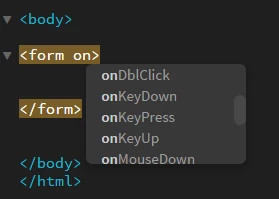
i'm amazed why "onInput" & some other Event Attributes not appears in code hints for most of html elements?

for example i want to use "onInput" for <Form> element but there is no choice in code hints section.

like this:
but for <output> Element it shows "onInput" attribute.

like this:
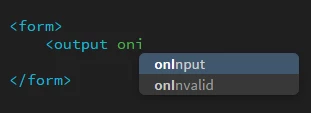
i know that i can add it manually and its not wrong from syntax sight !! but why Dreamweaver not show that choice in code hints?????

    This topic is closed to new replies. Start a new post to keep the conversation going.
    Nancy OShea
    Nancy OSheaCorrect answer
    Community Expert
    May 1, 2017

    <input type="color">, <input type="date">, <input type="datetime">, <input type="email">, <input type="month">, <input type="number">, <input type="password">, <input type="range">, <input type="search">, <input type="tel">, <input type="text">, <input type="time">, <input type="url">, <input type="week"> and <textarea>

    In non of mentioned elements, "oninput" code hint not shown too!!!!!


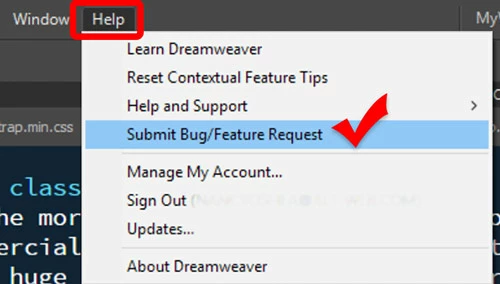
    Submit a Feature Request from the Help menu.

    Nancy O'Shea— Product User & Community Expert

    5 replies

    pziecina
    Legend
    May 1, 2017

    Probably because oninput only happens when an input elements value changes, this does not happen with a form element unless you are creating a custom event.

    Translate
    Participant
    May 1, 2017

    in examples below oninput used with <form> elements...

    Tryit Editor v3.4

    http://html5doctor.com/the-output-element/

    Translate
    Nancy OShea
    Community Expert
    Community Expert
    May 1, 2017

    oninput Event

    Supported form input tags:

    <input type="color">, <input type="date">, <input type="datetime">, <input type="email">, <input type="month">, <input type="number">, <input type="password">, <input type="range">, <input type="search">, <input type="tel">, <input type="text">, <input type="time">, <input type="url">, <input type="week"> and <textarea>

    Translate
    Nancy O'Shea— Product User & Community Expert