nigelh70638339
Inspiring
January 31, 2026
Answered

Open in Browser suddenly not working

  • January 31, 2026
  • 1 reply
  • 57 views

I noticed today that the ‘Open Browser’ feature is not working. Yesterday it was. There have been no updates over night and I have not made any changes. I right click the page tab but nothing happens.

Any help appreciated! 

Thanks in advance!

 

    Correct answer Nancy OShea

    Some things to try:

    1. Restart your computer.
    2. If you use a local Testing Server, to preview files on localhost, make sure your local server (Wamp, Xampp, Mamp...) is running.  
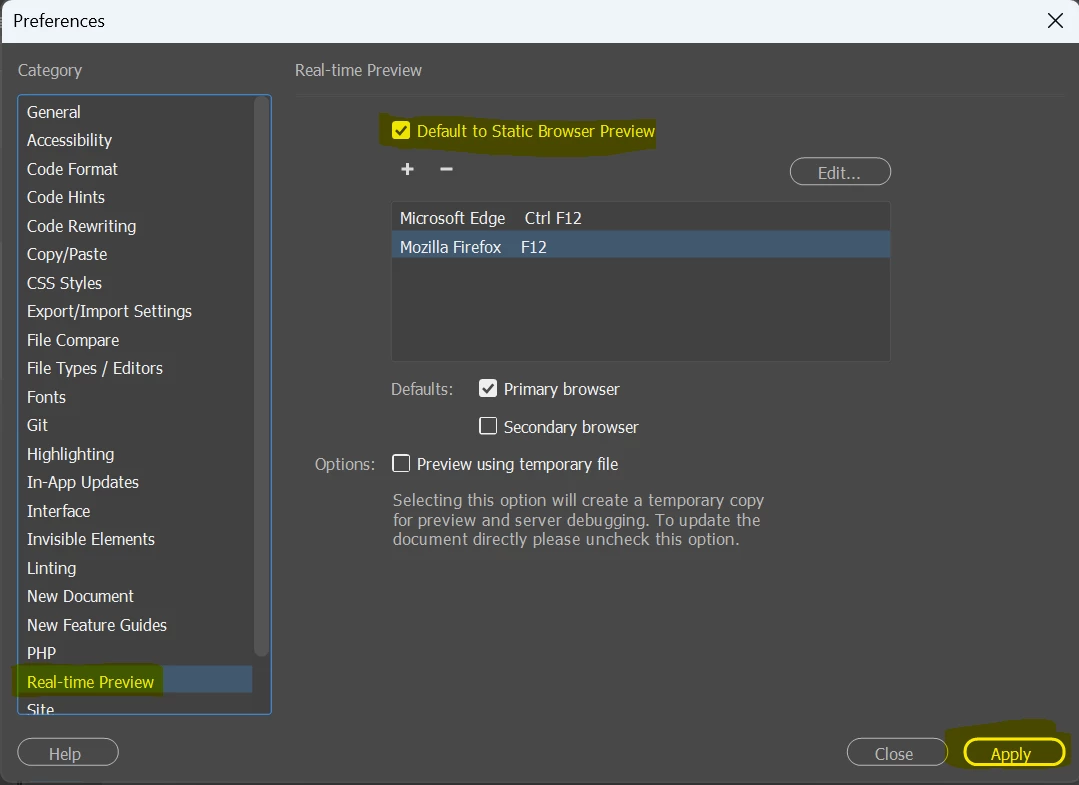
    3. Edit Preferences to Static Browser Preview.  See screenshot.

    Post back if you need more help.


    1 reply

    Nancy OShea
    Community Expert
    Nancy OSheaCommunity ExpertCorrect answer
    Community Expert
    February 1, 2026

    Some things to try:

    1. Restart your computer.
    2. If you use a local Testing Server, to preview files on localhost, make sure your local server (Wamp, Xampp, Mamp...) is running.  
    3. Edit Preferences to Static Browser Preview.  See screenshot.

    Post back if you need more help.


    Nancy O'Shea— Product User & Community Expert
    nigelh70638339
    Inspiring
    February 2, 2026

    HI Nancy, thank for the reply. I have restarted as suggested but didn’t make a difference. There were loads of software updates (not OS or DW), restarted and it all seems to be back to normal. Computers are strange beasts!!

    Thanks!

    Nancy OShea
    Community Expert
    Community Expert
    February 2, 2026

    Computers are strange beasts!!

    Thanks!

    ========

    Can’t live with ‘em, can’t live without ‘em.

    Glad your Browser Preview is working again. 😉


    Nancy O'Shea— Product User & Community Expert