


Participant
March 29, 2017
Answered

Opening the same file in different windows

  • March 29, 2017
  • 1 reply
  • 1113 views

Hi,

I was wondering how you can open the same file twice so that you can position one window at one point in the file and the other window in another part. Ideally, it would be best to somehow split the code view pane for the file so that you can go to one part of the file in one window and another part of the same file in the other window.

I've tried undocking the pane, but that just creates a floating pane. If you try to open the same file, it doesn't do anything because it is already open.

This is for Dreamweaver CC 2017.0.1

ADVthanksANCE,

Vik
This topic has been closed for replies.
Correct answer lnayal

Hi,

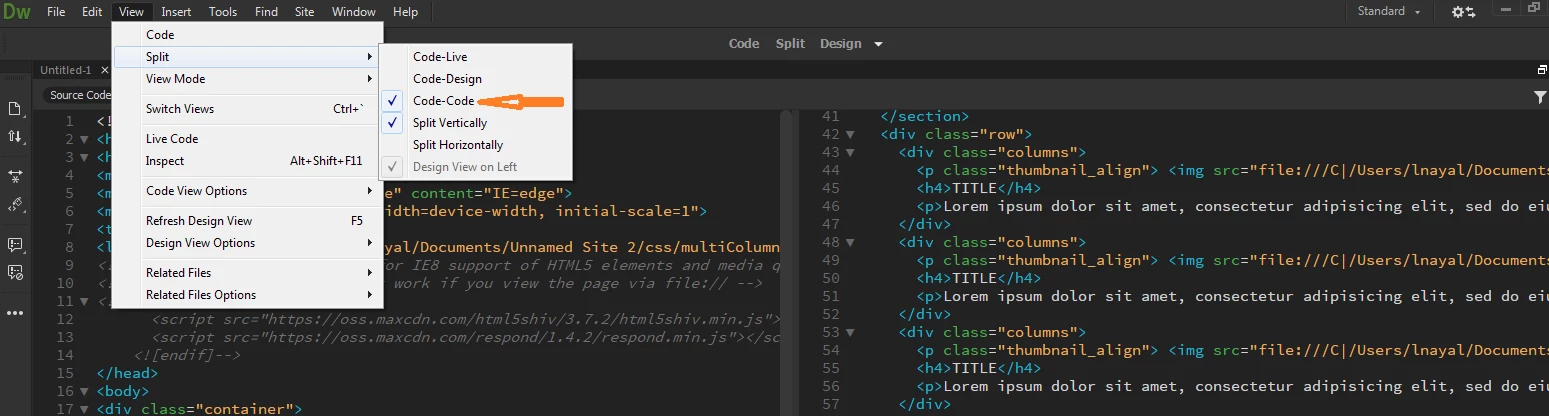
In DW CC 2017, there is an option of code-code view which allows you to have code view split in 2 windows.

This option is available under View menu > Split Views > Code code.

Do check that out, should be helpful.

Thanks,

Lalita

1 reply

lnayalCorrect answer
Participating Frequently
March 29, 2017

Hi,

In DW CC 2017, there is an option of code-code view which allows you to have code view split in 2 windows.

This option is available under View menu > Split Views > Code code.

Do check that out, should be helpful.

Thanks,

Lalita

VixoluxAuthor
Participant
March 30, 2017

Thank You Lalita. That was exactly what I needed!

Best,

Vik