



Jon Fritz
Community Expert
Community Expert
September 26, 2017
Question

OT: CC Desktop update makes Previous Versions much easier

  • September 26, 2017
  • 2 replies
  • 320 views

Hey, they finally came up with a way to stop having to say "No, not that Previous Versions, the other, hidden Previous Versions option" in the CC Desktop App.

Installing an old version is a two step process from the Apps tab now...

1. Click the Arrow by the Install Button and choose "Other Versions"...
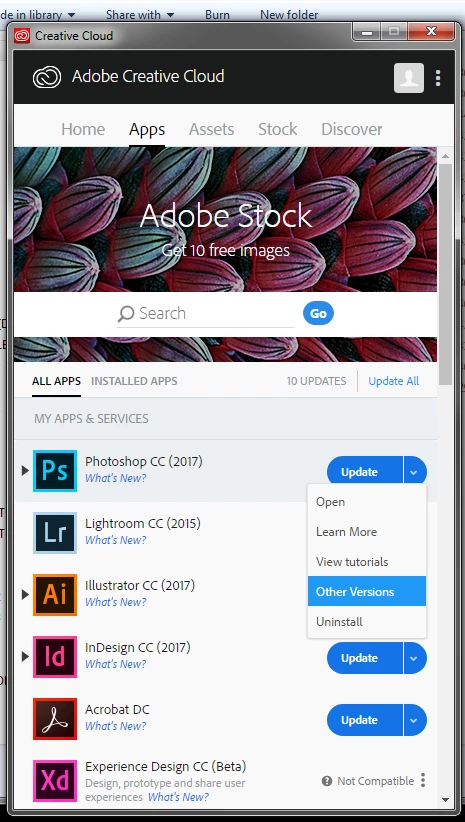
2. Pick the version you want from the modal window that pops up...
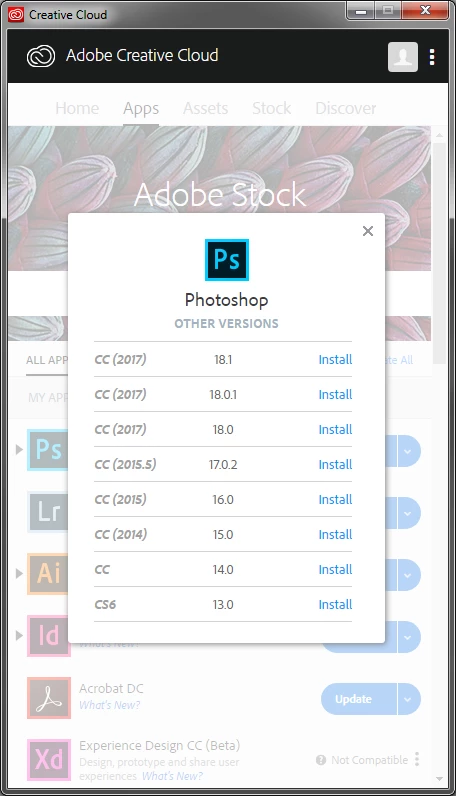
Nifty.

    This topic has been closed for replies.

    2 replies

    Preran
    Legend
    September 28, 2017

    Thank you for the feedback, Jon. I will share it with the concerned team.

    Thanks,
    Preran

    Nancy OShea
    Community Expert
    Community Expert
    September 26, 2017

    Yay!  Score one for the home team!

    Nancy O'Shea— Product User & Community Expert