Hosun
Inspiring
May 22, 2019
Answered

padding in em and px

  • May 22, 2019
  • 2 replies
  • 380 views

Hi,

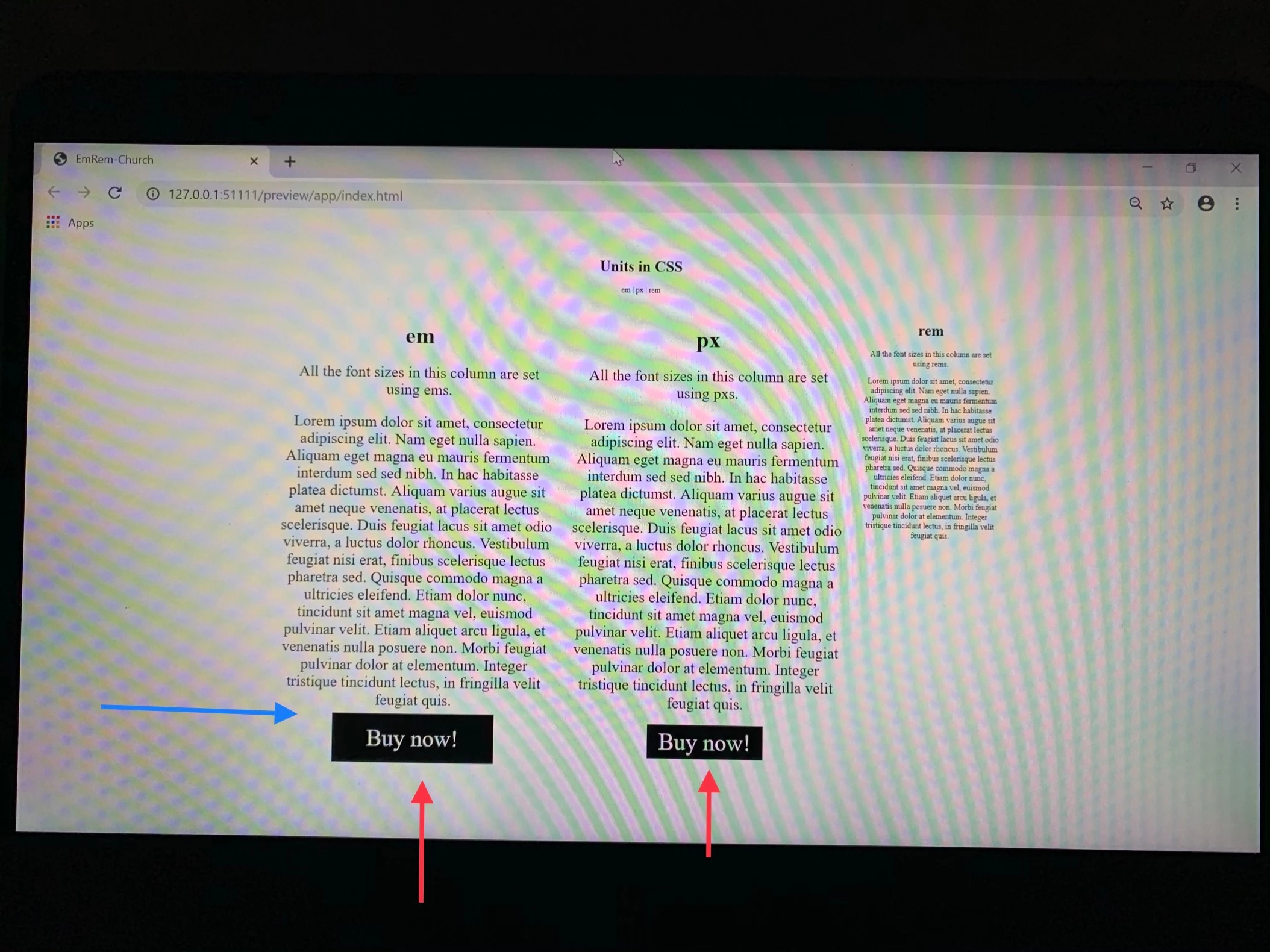
Q1. (red arrows)

I set each for em and px

padding: 0.5em 1.5em;

padding: 8px 24px;

Where does the difference come from?

I think the second button shoul be like the first one.

Q2. (blue arrow)

How to make a enough space between the paragraph and the button.

Link

EmRem-Church

Hosun Kang

This topic has been closed for replies.
Correct answer osgood_

Hosun  wrote

Hi,

Q1. (red arrows)

I set each for em and px

padding: 0.5em 1.5em;

padding: 8px 24px;

Where does the difference come from?

I think the second button shoul be like the first one.

Q2. (blue arrow)

How to make a enough space between the paragraph and the button.

Link

EmRem-Church

Hosun Kang

The second button will never be like the first one because you have explicitly set the padding in px and that never changes from device to device, it will always default to the specified px padding, unless you specifically change it using a media query.

I always use px because I personally find em and rem too freaking complex and I don't always want elements to be sized in 'ratio-aspect' to each other on smaller devices so I go in, look at the layout visually and then apply a size I think looks correct. But thats just me.

Its a little more work but I think the overall result looks more pleasing

2 replies

osgood_Correct answer
Legend
May 22, 2019

Hosun  wrote

Hi,

Q1. (red arrows)

I set each for em and px

padding: 0.5em 1.5em;

padding: 8px 24px;

Where does the difference come from?

I think the second button shoul be like the first one.

Q2. (blue arrow)

How to make a enough space between the paragraph and the button.

Link

EmRem-Church

Hosun Kang

The second button will never be like the first one because you have explicitly set the padding in px and that never changes from device to device, it will always default to the specified px padding, unless you specifically change it using a media query.

I always use px because I personally find em and rem too freaking complex and I don't always want elements to be sized in 'ratio-aspect' to each other on smaller devices so I go in, look at the layout visually and then apply a size I think looks correct. But thats just me.

Its a little more work but I think the overall result looks more pleasing

BenPleysier
Community Expert
Community Expert
May 22, 2019

This is very easy to explain.

px is an absolute dimension

em is a relative dimension related to the size of the font of its predecessor

rem is a relative dimension related to the size of the root font

Change the em to rem in the style rules for .btn-em to see the difference

Wappler is the DMXzone-made Dreamweaver replacement and includes the best of their powerful extensions, as well as much more!