
Participant
June 9, 2018
Answered

Page Preview

  • June 9, 2018
  • 2 replies
  • 763 views

I can upload files stored on my external drive through Dreamweaver. However, when I try to Preview a page, I get a message that tells me I'm trying to access an external HTML file that cannot be opened with this device for preview. The message instructs me to open it in Dreamweaver, through which I tried to do the preview in the first place. Is this indicative of a problem with Dreamweaver, with the external drive (which is fairly new), or with the computer (which is very new)? . Thank you.

This topic has been closed for replies.
Correct answer Nancy OShea

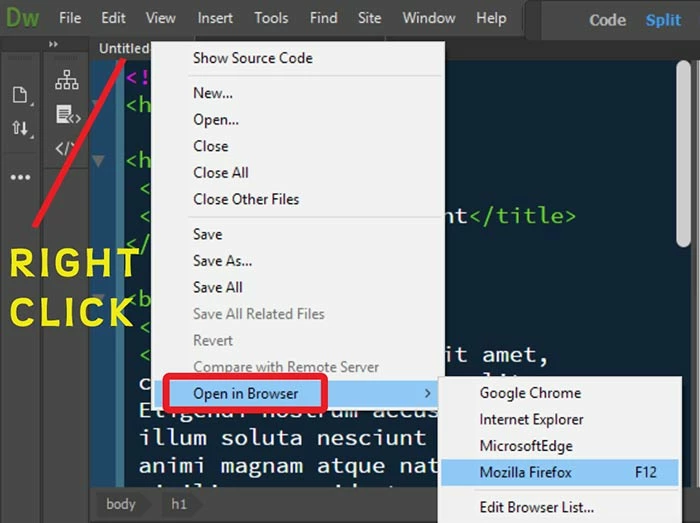
Right-click on an open document tab and select Open in Browser.  

I suspect Real-Tme Preview  isn't playing nice with your external drive for the same reasons it doesn't like my local testing server. 

2 replies

Nancy OShea
Community Expert
Nancy OSheaCommunity ExpertCorrect answer
Community Expert
June 9, 2018

Right-click on an open document tab and select Open in Browser.  

I suspect Real-Tme Preview  isn't playing nice with your external drive for the same reasons it doesn't like my local testing server. 

Nancy O'Shea— Product User & Community Expert
BenPleysier
Community Expert
Community Expert
June 9, 2018

To preview a document in Dreamweaver, you must setup a site as per Project overview and site setup |

Wappler is the DMXzone-made Dreamweaver replacement and includes the best of their powerful extensions, as well as much more!
Participant
June 9, 2018

It is set up. It was properly working. Suddenly, it stopped. The file manager is working fine to upload files to the C-Panel and to do all other functions in Dreamweaver, except Preview.

BenPleysier
Community Expert
Community Expert
June 9, 2018

Please have a look at this discussion Real Time Preview doesn't work

Wappler is the DMXzone-made Dreamweaver replacement and includes the best of their powerful extensions, as well as much more!