Participant
March 29, 2017
Answered

Page width in DW live view is different in Chrome

  • March 29, 2017
  • 3 replies
  • 1019 views

Hi peeps, I am new to dreamweaver so please bear with me.

I have started a web page in dreamweaver which has a top menu bar that covers the entire width of the screen in dreamweaver live view, but when I view it in Chrome it only covers around 2/3rds of the width of the screen.

What gives?

I would have thought that the live view in DW would give you a true representation of the page, so why is it the different in Chrome?

I'm not sure which one to believe.

Many thanks

This topic has been closed for replies.
Correct answer BenPleysier

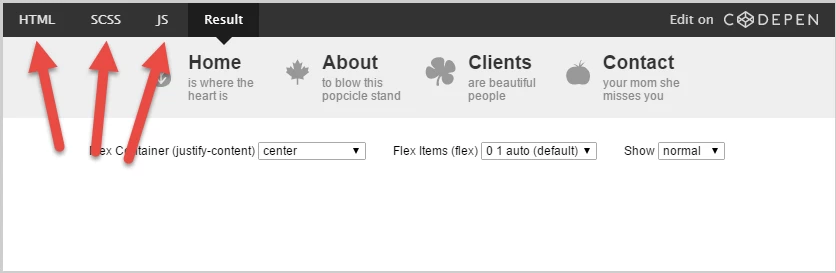
If you go here Flexbox Bar Navigation Demo | CSS-Tricks and after reading the article, see the code for the various languages as per

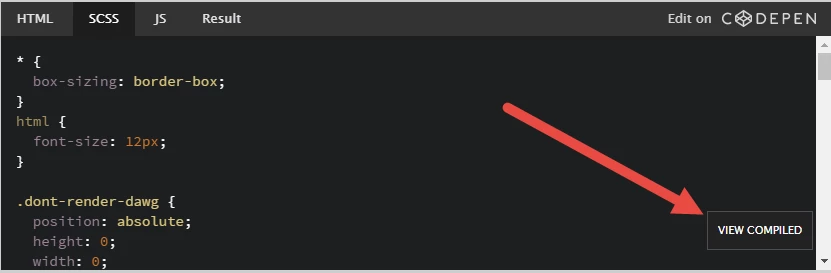
When you open the SCSS tab, go to the compiled version as per

3 replies

BenPleysier
Community Expert
Community Expert
March 30, 2017

It is a matter of real-estate, the browser has a greater width than Live/Design view in Dreamweaver. If you give the menubar a background colour, you will see that it stretches across the whole width of the client window. However, when you shrink the browser window to the same width as Dreamweaver, you will see that the contents of the menubar will fit the full width similar to Dreamweaver.

Wide browser window

Narrow browser window

Wappler is the DMXzone-made Dreamweaver replacement and includes the best of their powerful extensions, as well as much more!
danbs10Author
Participant
March 30, 2017

Hi Ben thanks for your reply. I have given the menu bar a background color and it does indeed stretch the width of the window but I still do not understand how I fix this issue.

Thanks

BenPleysier
Community Expert
BenPleysierCommunity ExpertCorrect answer
Community Expert
March 30, 2017

If you go here Flexbox Bar Navigation Demo | CSS-Tricks and after reading the article, see the code for the various languages as per

When you open the SCSS tab, go to the compiled version as per

Wappler is the DMXzone-made Dreamweaver replacement and includes the best of their powerful extensions, as well as much more!
Nancy OShea
Community Expert
Community Expert
March 29, 2017

Change your Zoom settings in Chrome to 100% or Ctrl+0 *zero*.

I think Chrome boosts the zoom to 125% or 150% depending on your screen res.

Nancy

Nancy O'Shea— Product User & Community Expert
pziecina
Legend
March 29, 2017

It all depends in the width of your browser, and the width of Dw's live view being the same.

Also are you specifying any width in absolute measurements, such as pixel values.

danbs10Author
Participant
March 29, 2017

Hi I have set the page width to 100%.

thanks

pziecina
Legend
March 29, 2017

danbs10  wrote

Hi I have set the page width to 100%.

thanks

The page width does not matter, your menu if you are using absolute values such as pixels, will not expand or contract, try using % values.