
Inspiring
August 18, 2010
Answered

Page with tabs

  • August 18, 2010
  • 1 reply
  • 689 views

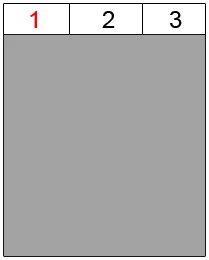
Yet another question. Attached a raw example of what I would like to accomplish. I don't know whether this should be in the 'spry section' of the forum or not. I would like a team page to contain 3 tabs, which all 3 pre-load. Tab 1 for example contains the team's calendar, tab 2 contains the team's ranking and tab 3 would contain some general info on players etc.

By default, tab 1 should be visible in the grey area. The grey area thus should display all the info that goes with each tab. I tried a simple click/show javascript but there the problem was that it displayed tab 2 under the content from tab 1 etc. I have absolutely no experience whatsoever with JS, spry or jquery.

Somebody any experience with this? And if possible a hint to a solution? Thank you!
This topic has been closed for replies.
Correct answer BenPleysier

Add the constructor to the bottom of your document just above the </body> tag

<script type="text/javascript">
var TabbedPanels1 = new Spry.Widget.TabbedPanels("tp1");
</script>

1 reply

BenPleysier
Community Expert
Community Expert
August 18, 2010

Have a look here http://labs.adobe.com/technologies/spry/samples/tabbedpanels/tabbed_panel_sample.htm or here http://labs.adobe.com/technologies/spry/samples/tabbedpanels/tabbed_panel_sample2.html

Wappler is the DMXzone-made Dreamweaver replacement and includes the best of their powerful extensions, as well as much more!
derjaanAuthor
Inspiring
August 18, 2010

Thank you for the reply! I followed your first link and used the first basic example (http://labs.adobe.com/technologies/spry/samples/tabbedpanels/tabbed_panel_sample.htm) and tried to use it in a blank page. I took over the HTML code as well as the css and javascript file. However, the panel shows all its content from all 4 tabs as you can see below. It outputs the picture below the html code. When inspecting the element after clicking on it, it does not show the tab to be selected nor the containing div.

<!DOCTYPE html PUBLIC "-//W3C//DTD XHTML 1.0 Transitional//EN" "http://www.w3.org/TR/xhtml1/DTD/xhtml1-transitional.dtd">
<html xmlns="http://www.w3.org/1999/xhtml">
<head>
<meta http-equiv="Content-Type" content="text/html; charset=utf-8" />
<link rel="stylesheet" type="text/css" href="_styles/sprytabbedpane.css" />
<title>Untitled Document</title>
<style type="text/css">
<!--
.TabbedPanels {
    width: 500px;
}
.TabbedPanelsTab {
    font-family: sans-serif;
    font-size: 12px;
    font-weight: bold;
}
hr {
    clear: left;
}
.TabbedPanels1 {    width: 500px;
}
.TabbedPanelsTab1 {    font-family: sans-serif;
    font-size: 12px;
    font-weight: bold;
}
-->
</style>
<script language="javascript" type="text/javascript" src="_javascript/sprytabbedpanels.js"></script>
</head>
<body>

<div class="TabbedPanels" id="tp1">
  <ul class="TabbedPanelsTabGroup">
    <li class="TabbedPanelsTab" tabindex="0">Tab 1</li>
    <li class="TabbedPanelsTab" tabindex="0">Tab 2</li>
    <li class="TabbedPanelsTab" tabindex="0">Tab 3</li>
    <li class="TabbedPanelsTab" tabindex="0">Tab 4</li>
  </ul>
  <div class="TabbedPanelsContentGroup">
    <div class="TabbedPanelsContent"> Tab 1 Content </div>
    <div class="TabbedPanelsContent"> Tab 2 Content </div>
    <div class="TabbedPanelsContent">
      <p>Tab 3 Content </p>
      <p>More Content</p>
      <p>More Content</p>
    </div>
    <div class="TabbedPanelsContent"> Tab 4 Content</div>
  </div>
</div>

</body>
</html>

BenPleysier
Community Expert
BenPleysierCommunity ExpertCorrect answer
Community Expert
August 18, 2010

Add the constructor to the bottom of your document just above the </body> tag

<script type="text/javascript">
var TabbedPanels1 = new Spry.Widget.TabbedPanels("tp1");
</script>

Wappler is the DMXzone-made Dreamweaver replacement and includes the best of their powerful extensions, as well as much more!