
Inspiring
March 23, 2022
Answered

Panel placed on second monitor won't stay put

  • March 23, 2022
  • 3 replies
  • 433 views

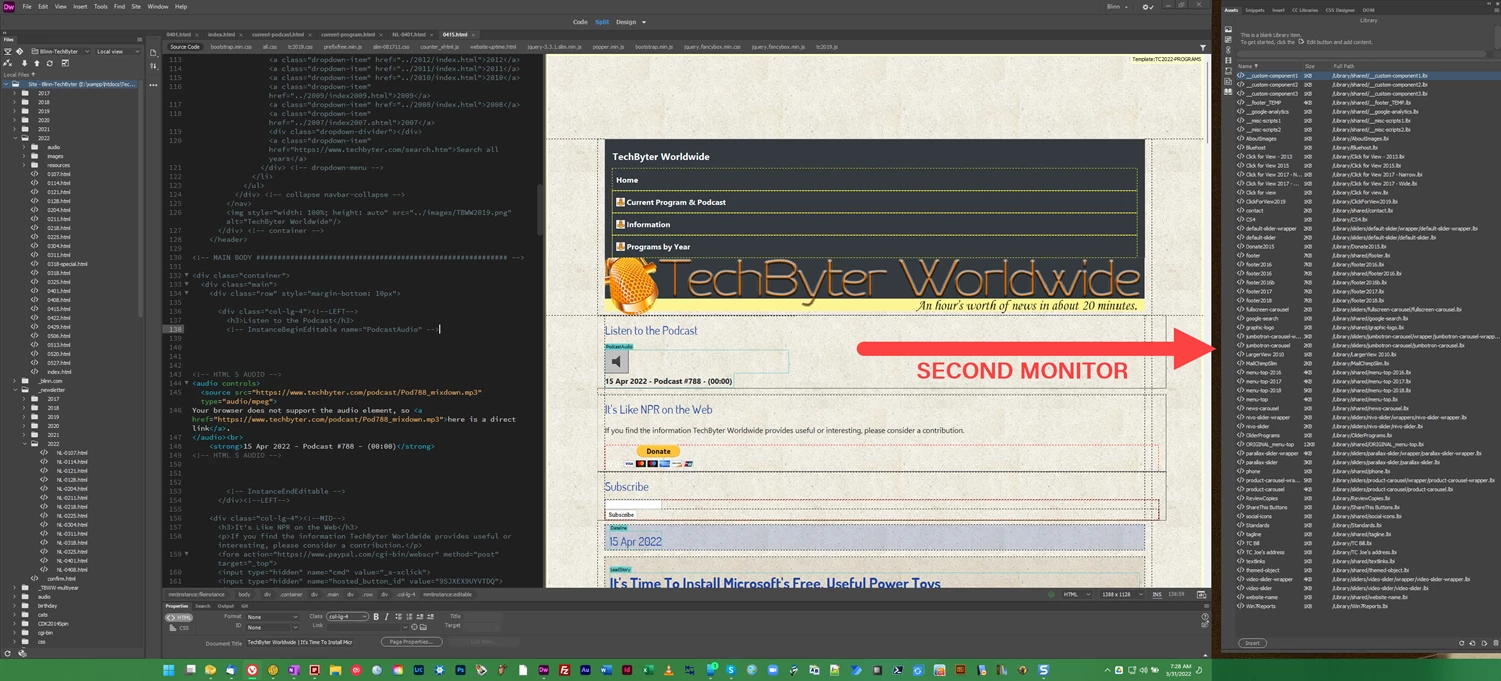
EDITED TO ADD: Two days later, inexplicably, the panel on the second screen stayed on the second screen. There had been no hardware or software changes, no driver updates. But now it works as expected.


Hmm. Edited AGAIN to note that the panel on the second monitor no longer appears on the second monitor. Adobe is just "funning" with me, eh? Minor annoyance. Not resolved.


After buying a new computer, I'm having a small problem with Dreamweaver. Two monitors are attached to the computer and I have placed one of Dreamweaver's windows (Assets, Snippets, Insert, and a few other items) on the second monitor. I defined a new workspace with this arrangement, but when I open Dreamweaver, the panel that should be on the second monitor is back on the primary monitor.


Also, if I choose another workspace and then switch back to my preferred workspace, the panel returns to the primary monitor.


This worked properly on my old computer. It's not a huge probelm. After all, I can just drag the panel where I want it. But it is annoying. What should I do to to resolve this?


Thanks!
    This topic has been closed for replies.
    Correct answer TechByter

    There was a configuration issue with Windows Search that created a problem for TechSmith's SnagIt. Fixing that issue corrected the problem with SnagIt.

    Additionally, since fixing the problem with Search, Dreamweaver's second-monitor panels open as expected on the second monitor.

    I don't see the connection or the logic and it's unclear that there is any connection; but, as they say, it is what it is.

    3 replies

    TechByterAuthorCorrect answer
    Inspiring
    March 31, 2022

    There was a configuration issue with Windows Search that created a problem for TechSmith's SnagIt. Fixing that issue corrected the problem with SnagIt.

    Additionally, since fixing the problem with Search, Dreamweaver's second-monitor panels open as expected on the second monitor.

    I don't see the connection or the logic and it's unclear that there is any connection; but, as they say, it is what it is.

    TechByterAuthor
    Inspiring
    March 24, 2022

    Hi, Nancy,

    Here are the specs:

    Dreamweaver 21.1

    Windows 11

    Both monitors are on an Nvidia RTX A3000 GPU with 6GB of RAM via a Thunderbolt 3 to dual HDMI adapter.

    Nancy OShea
    Community Expert
    Community Expert
    March 24, 2022

    I must defer to other users as I don't use Windows 11.  Also it's NOT mentioned in DW's system requirements.

    https://helpx.adobe.com/dreamweaver/system-requirements.html


    Nancy O'Shea— Product User & Community Expert
    TechByterAuthor
    Inspiring
    March 24, 2022

    Thanks. 

    Nancy OShea
    Community Expert
    Community Expert
    March 23, 2022

    Which version of Dreamweaver?

    Which operating system?

    Are both monitors using the same video card?


    Nancy O'Shea— Product User & Community Expert