
Participant
September 28, 2020
Answered

Paste in Serach box under Code window overwrites code.

  • September 28, 2020
  • 2 replies
  • 335 views

There is a much frustrating and potentially disasterous UX flaw concerning the search window i windows version of DW cc 2020.


1. Select text from wherever into windows clipboard

2. Goto any code showing window in dreamweaver cc 2020. (In my case a -js file.)

3. Click Ctrl F to bring up the search box.

4. Click Ctrl V to paste into the now selected search box.

5. ERROR! The pasted text overwrites code in the code window rather that in the search box.


What am I doing wrong? Or am I correct in this being an error in the user interface?


br, Anders
 

    This topic has been closed for replies.
    Correct answer Nancy OShea

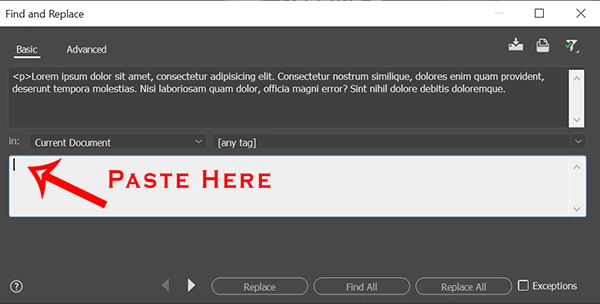
    Use Ctrl + Shift + F for the advanced F&R panel.  See screenshot.


    2 replies

    Nancy OShea
    Community Expert
    Nancy OSheaCommunity ExpertCorrect answer
    Community Expert
    September 28, 2020

    Use Ctrl + Shift + F for the advanced F&R panel.  See screenshot.


    Nancy O'Shea— Product User & Community Expert
    Participant
    September 29, 2020

    Hi Nancy. Thanks that works 🙂


    (I still think their non-standard "paste-into-non-active-window" should be corrected.)

    Nancy OShea
    Community Expert
    Community Expert
    September 29, 2020

    I'm not sure I understand the difficulty you're having with F&R panels.  But feel free to submit your concerns to Uservoice where the product engineers will see it.   Go to Help > Submit Bug/Feature Requests.


    Nancy O'Shea— Product User & Community Expert
    B i r n o u
    Legend
    September 28, 2020

    wel, I just try to reproduce your steps, but here it works as expected.

    any way, try a second use case, before hitting Ctrl-F, select the portion of text that you want to find and see in the search field fill up by itself.

    which version (build) of Dreamweaver are you running ?

    Participant
    September 29, 2020

    Dreamweaver 20.2 15263


    Thanks. The "mark-text-in-code-and-then-hit-ctrl-F" function that you suggest works. But that's not really the problem. I have 3000+ lines with js code and sometimes I have to jump back and forth in the code. Then it is easy to have a word or even a whole line of code in the clipboard and use the search function to find it. Too many times I have seen dreamweaver overwrite my code just because I forgot that DW has a strange way of pasting into the inactive(!) window - which happens to be my valuable code ...

    I wonder what part of their ux Abode think benefits of this non-standard behavior?


    Anyway, thanks for helping 😉