


Participant
March 13, 2017
Answered

PHP Includes gone from support files in toolbar

  • March 13, 2017
  • 3 replies
  • 369 views

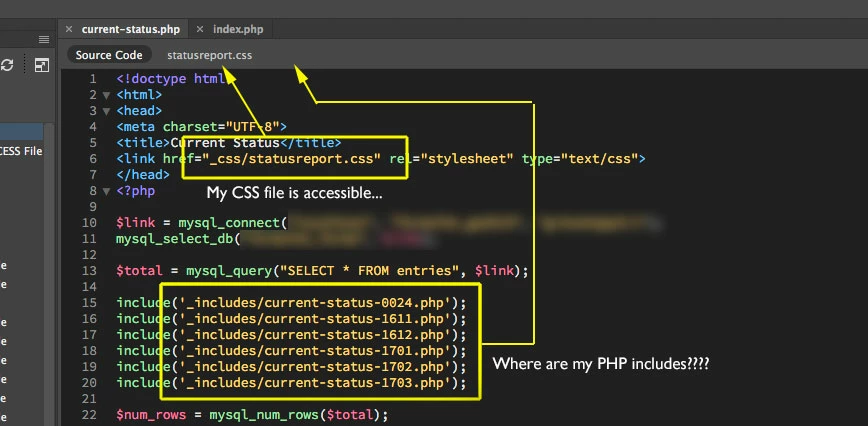
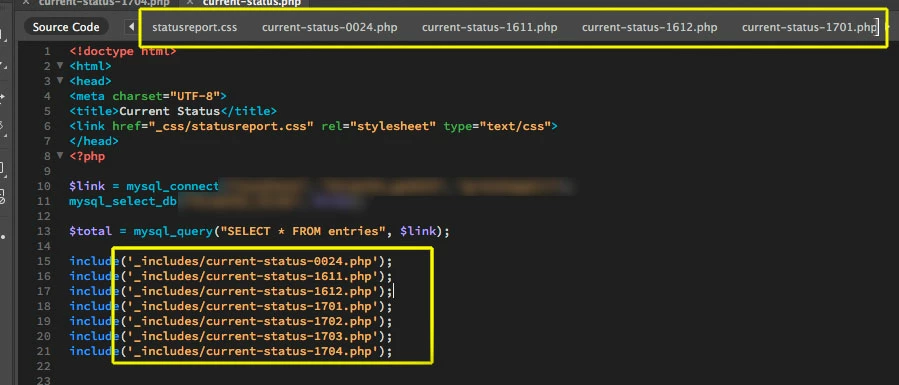
Hello this morning I fired up dreamweaver and noticed a negative development. I am accustomed to opening a file and seeing easy-access links to all the support CSS, Javascript and PHP includes available to the right of the source code in the toolbar. Now the php includes are gone. Does anyone know what happened to them and how to get them back?
Thanks in advance for any advice.

    This topic has been closed for replies.
    Correct answer Matt Lobo

    I don't know what the problem was, but after discovering I couldn't perform a "Save As" either, I decided to try deleting the DW preferences. This resolved the problem(s). I quit out of Dreamweaver and deleted the following (Mac):

    When I restarted, the php includes became available again.

    Thanks to Nancy and Jon for your replies!

    3 replies

    Matt LoboAuthorCorrect answer
    Participant
    March 13, 2017

    I don't know what the problem was, but after discovering I couldn't perform a "Save As" either, I decided to try deleting the DW preferences. This resolved the problem(s). I quit out of Dreamweaver and deleted the following (Mac):

    When I restarted, the php includes became available again.

    Thanks to Nancy and Jon for your replies!

    Nancy OShea
    Community Expert
    Community Expert
    March 13, 2017

    Related Files is an option in your Preference settings.   See screenshot.

    Nancy O'Shea— Product User & Community Expert
    Matt LoboAuthor
    Participant
    March 13, 2017

    Thanks but that's not the problem. "Enable Related Files" was active as it has always been. Also, related CSS and JS files are still showing, just not the PHP files any longer. For the record, I did turn off "Enable Related Files," restart, turn it on again, restart, and that didn't solve my problem.

    The PHP files are not listed in View: Related Files.

    View: Related Files Options: Refresh Related Files does nothing.

    Jon Fritz
    Community Expert
    Community Expert
    March 13, 2017

    DW may be having issue with your PHP, maybe an error was introduced somewhere else in the code and the program doesn't understand how to parse what it's seeing?

    As a test, what happens when you add a new include in a separate PHP tag to the <body> of the page?

    Nancy OShea
    Community Expert
    Community Expert
    March 13, 2017

    Go to View > Related Files.  Do you see them listed there?

    Go to View > Related File Options > Refresh Related Files.

    Nancy

    Nancy O'Shea— Product User & Community Expert