This topic has been closed for replies.
Correct answer suzetteb58689955

Rename your files without any spaces or special characters.  You can legally use dots, dashes or underscores if needed but no spaces. 

Servers are cAsE sEnSiTiVe.  Stick with a file naming convention you can repeat, for example all small case letters. 

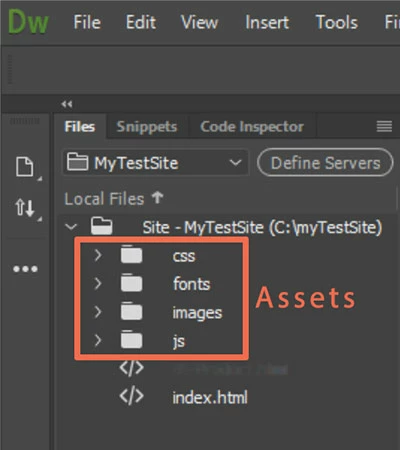
Perform renaming tasks in your DW Local Files Panel -- see screenshot below.  When prompted to update links, hit YES.

You can drag images to any folder you wish but for simplicity, I prefer keep all images in a common folder.  For example, images.

about.filename1.jpg

about.filename2.jpg

notes.filename1.jpg

notes.filename2.jpg

and so on.....


Thanks for this help, Nancy.

1 reply

Jon Fritz
Community Expert
Community Expert
October 20, 2017

Looks like you forgot to upload the images themselves, or uploaded them to the wrong location.

I'm seeing a 404 File Not Found Error for the images.

Inspiring
October 20, 2017

I'm a bit of a novice here. Someone else designed my website, so bear with my questions. :-)

If you see the thumbnail image, I had assumed the painting image was also on the paintings page, but apparently not so.

Are you suggesting for all of the images where you see no image when you click on the thumbnail, to add these full images to the paintings page, too? I think this is what you're saying. And is there a way I'm supposed to connect the clicking on the thumbnail to each of the images?

Thanks.

Suzette

suzetteb58689955AuthorCorrect answer
Inspiring
October 21, 2017

Rename your files without any spaces or special characters.  You can legally use dots, dashes or underscores if needed but no spaces. 

Servers are cAsE sEnSiTiVe.  Stick with a file naming convention you can repeat, for example all small case letters. 

Perform renaming tasks in your DW Local Files Panel -- see screenshot below.  When prompted to update links, hit YES.

You can drag images to any folder you wish but for simplicity, I prefer keep all images in a common folder.  For example, images.

about.filename1.jpg

about.filename2.jpg

notes.filename1.jpg

notes.filename2.jpg

and so on.....


Thanks for this help, Nancy.