


Participant
June 23, 2017
Answered

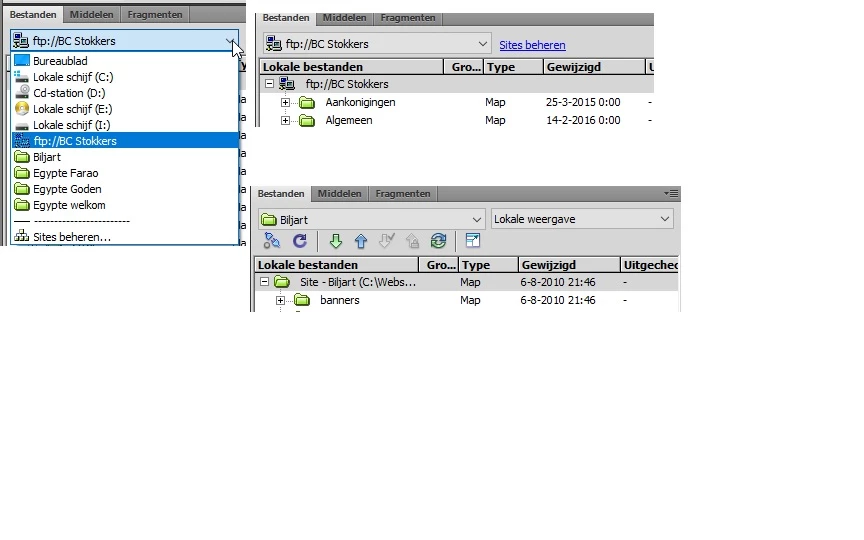
Plotseling staat er ftp:// voor mijn website naam

  • June 23, 2017
  • 1 reply
  • 366 views

Hallo, sinds kort heb ik opeens bij mijn lokale site een voorvoegsel staan van ftp://, met tot gevolg dat mijn werkbalk met de upload en download button is verdwenen, bij mijn andere websites is dit niet het geval gelukkig. Maar kan iemand mij vertellen hoe ik dit ongedaan kan maken cq kan herstellen, want wat ik ook probeer het lukt mijzelf niet helaas. Heb een plaatje toegevoegd ter verduidelijking van het verschil.
This topic has been closed for replies.
Correct answer andrederuiter

Removing the wite out of Dreamweaver and put it in again was the answer, everything is okay again.

Thanks for the support.

1 reply

Adobe Employee
June 23, 2017

What you're seeing is your local file system, looks like a connection exists to a location on a FTP server.  Do you have a site hosted on Business Catalyst?

Best if you set up your local sites using the Manage Sites dialog box, see Een lokale versie van uw website instellen met Dreamweaver

Participant
June 24, 2017

Hello, I'm not aware of hosting my site on a Business Catalyst, I don't know what that is.

The strange thing is that it was normal for years and last week, suddenly there was ftp:// standing for my website, I don't know what I've to create this, but when I understand you correctly Then I have to remove my site out of Dreamweaver and then place it back in the way you described, is that correct?