Participant
May 22, 2018
Answered

Pls Help - 1st time builder using DW 18 - any pdfs 4 1st site?

  • May 22, 2018
  • 2 replies
  • 601 views

Not a skilled site designer and would like to put up a basic site for my med device startup.  Have spent 2-3 days either watching DW videos online and/or reading manuals from library and old pdfs on DW 5 - 10+.  Synonyms seem to never go out of style.  Anyone know of a simple easy to understand 5 - 15 page user manual in pdf form so I may set up one very simple rather basic bland no frills vanilla website?  I find tissue engineering easier to understand than DW manuals, sadly.

This topic has been closed for replies.
Correct answer Nancy OShea

There are no PDF manuals  I know of.   Understanding HTML & CSS is far more important than learning software.   Read the chapters & work with the code exercises in links below.

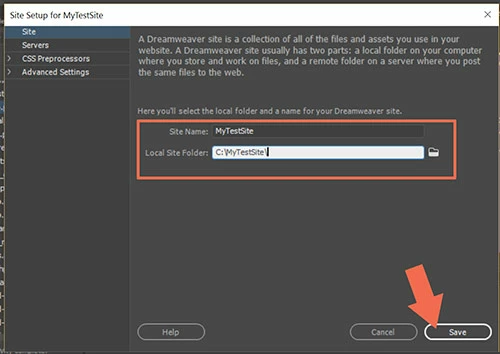
Since you're just starting out, I suggest using a starter template in DW as the foundation for your project.  First define your local site folder.  Go to Site > New Site...  Give your project a name and location folder.  Example, C:\MyTestSite\   See screenshots below.

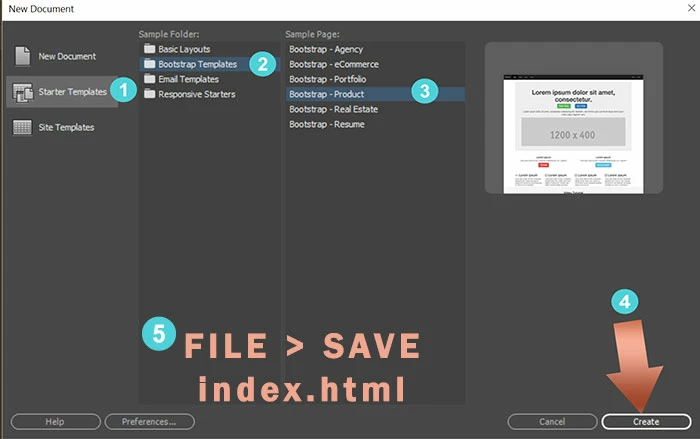
Go to File > New > Starter Templates.  Pick one and hit the Create button.

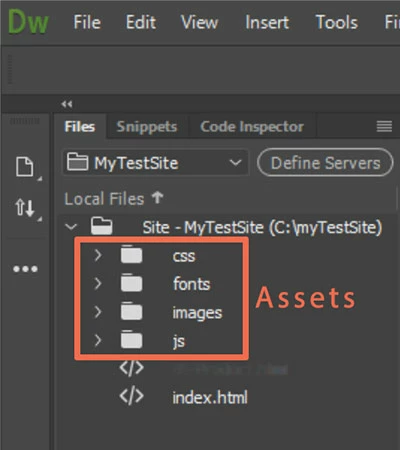
After you save your newly created document, DW will create assets folders for your project as can be seen in your Files Panel (F8).

You now have the basis for creating your new site.   Post back if have more questions.

Nancy

2 replies

Nancy OShea
Community Expert
Nancy OSheaCommunity ExpertCorrect answer
Community Expert
May 22, 2018

There are no PDF manuals  I know of.   Understanding HTML & CSS is far more important than learning software.   Read the chapters & work with the code exercises in links below.

Since you're just starting out, I suggest using a starter template in DW as the foundation for your project.  First define your local site folder.  Go to Site > New Site...  Give your project a name and location folder.  Example, C:\MyTestSite\   See screenshots below.

Go to File > New > Starter Templates.  Pick one and hit the Create button.

After you save your newly created document, DW will create assets folders for your project as can be seen in your Files Panel (F8).

You now have the basis for creating your new site.   Post back if have more questions.

Nancy

Nancy O'Shea— Product User & Community Expert
Participant
May 22, 2018

Nancy,  will do.  Was taught to dance with the girl who brought you to the party, so plan A continues until either I'm incapacitated or B is truly necessary.  THX!

John Waller
Community Expert
Community Expert
May 22, 2018

I would forget about DW. It's overkill for what you want.

Put up a Wordpress site in 5 mins. Maybe using a Premium (paid for) Theme which has lots of custom options.

Participant
May 22, 2018

John, Thank you for the response.  I did see a WP theme that fit well for our startup.  May try to mimic it and go with Nancy's advice, giving it the old college try first with DW before a WP plan B.   THX!

John Waller
Community Expert
Community Expert
May 23, 2018

May try to mimic it

5 mins in Wordpress. 3-6 months for a DW novice.

Good luck with whatever you decide. I wish you every success.