If you're using a complete Bootstrap document, you don't need anything more than the requisite classes in your HTML code.
Nancy
As a working example:
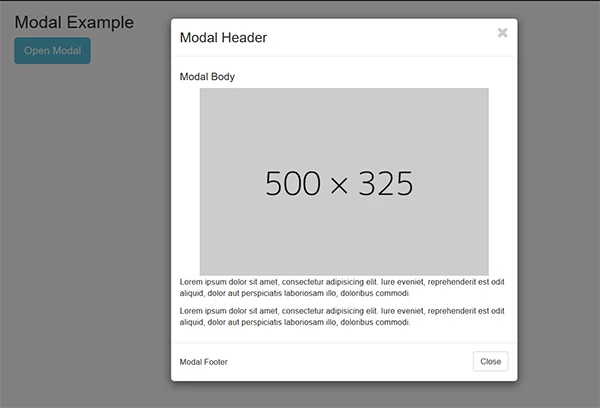
<!doctype html>
<html lang="en">
<head>
<meta charset="utf-8">
<title>Bootstrap 3.3.7 Starter</title>
<meta name="viewport" content="width=device-width, initial-scale=1">
<meta http-equiv="X-UA-Compatible" content="IE=edge">
<!-- Latest compiled and minified Bootstrap CSS-->
<link rel="stylesheet" href="https://maxcdn.bootstrapcdn.com/bootstrap/3.3.7/css/bootstrap.min.css" integrity="sha384-BVYiiSIFeK1dGmJRAkycuHAHRg32OmUcww7on3RYdg4Va+PmSTsz/K68vbdEjh4u" crossorigin="anonymous">
</head>
<body>
<div class="container">
<h2>Modal Example</h2>
<!-- Trigger the modal with a button -->
<button type="button" class="btn btn-info btn-lg" data-toggle="modal" data-target="#myModal">Open Modal</button>
<!-- Modal -->
<div class="modal fade" id="myModal" role="dialog">
<div class="modal-dialog">
<!-- Modal content-->
<div class="modal-content">
<div class="modal-header">
<h3 class="modal-title pull-left">Modal Header</h3>
<button type="button" class="close" data-dismiss="modal"><span class="glyphicon glyphicon-remove"></span></button>
</div>
<div class="modal-body">
<h4>Modal Body</h4>
<img class="center-block" src="http://dummyimage.com/500x325.jpg" alt="placholder">
<p>Lorem ipsum dolor sit amet, consectetur adipisicing elit. Iure eveniet, reprehenderit est odit aliquid, dolor aut perspiciatis laboriosam illo, doloribus commodi.</p>
<p>Lorem ipsum dolor sit amet, consectetur adipisicing elit. Iure eveniet, reprehenderit est odit aliquid, dolor aut perspiciatis laboriosam illo, doloribus commodi.</p>
</div>
<div class="modal-footer">
<h5 class="pull-left">Modal Footer</h5>
<button type="button" class="btn btn-default" data-dismiss="modal">Close</button>
</div>
</div>
</div>
<!--/modal--></div>
<!--/container--></div>
<!--latest jQuery-->
<script src="https://code.jquery.com/jquery-1.12.2.min.js" integrity="sha256-lZFHibXzMHo3GGeehn1hudTAP3Sc0uKXBXAzHX1sjtk=" crossorigin="anonymous">
</script>
<!--Bootstrap-->
<script src="https://maxcdn.bootstrapcdn.com/bootstrap/3.3.7/js/bootstrap.min.js" integrity="sha384-Tc5IQib027qvyjSMfHjOMaLkfuWVxZxUPnCJA7l2mCWNIpG9mGCD8wGNIcPD7Txa" crossorigin="anonymous"></script>
</body>
</html>
Nancy





 AdChoices
