For a challenge, I tried coding my homepage from scratch and it is now a bit of a mess. It was designed for a desktop but it looks awful on an iPad and phone. I can't really get my head around when to use the various types of positioning.
Can someone advise what type of positioning the various elements need to always stay in the right place in relation to the other elements?
If you know how to work with them, starter templates can save you a huge amount of development time
In the interest of transparency, I gave the OP several options, one of which is related to Bootstrap. I did not, as you so blindly do, push him to Bootstrap. Your sensitivity is giving you away, Nancy.
I offered to help gunzelguy. That would involve learning how to code. I don't do mindless, Nancy. There are enough folks inn this forum qualified in that area.
Go ahead and lock this thread, because it's pointless and I'm sick of reading your posts.
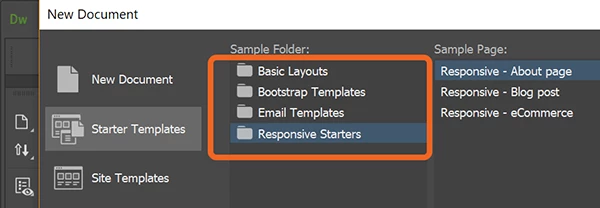
I never steered anyone to Bootstrap, blindly or otherwise, Al. I suggested the free starter templates in DW CC as a means to an end. If you look closely at the UI, there are 4 categories to choose from -- Basic Layouts to Responsive Starters. Bootstrap is one category but not the only one.
For anyone interested in learning to code layouts manually, I recommend this video intoduction to Flexbox. 6 examples are covered in a little over 20 minutes.
If you wish to learn how to do rwd layouts, (complete with all modern methods, including srcset for images) and you are willing to learn using a book, then try -
Use the best parts of both and you can make really any layout you want, and have it break down gracefully on smaller devices, regardless of the program you're using to input the code.
Position: absolute for primary layouts will not work in responsive web design. Why? Because positioning removes content from the normal document flow which causes total chaos when elements are re-distributed to fit smaller devices. It's best to forgo any forced positioning and just allow elements to flow naturally.
Start over with one of the free Responsive Starter Templates in DW. Go to File > New > HTML. See screenshot. Select one of the layouts and hit Create button. Save and name your newly created document as index.html. This should give you a good starting point from which to build your website.
One final word about code errors. Do not use special characters or spaces in web file names. Spaces cause code validation errors and could potentially lead to other problems. See validation results below.
Sorry, I didn't mean to start a Bootstrap is good/bad war. I was just hoping to get some tips about what sort of positioning to apply to avoid the elements crashing about the screen on smaller devices, I'll just get back to ploughing through a few html/CSS books.
Sorry, I didn't mean to start a Bootstrap is good/bad war. I was just hoping to get some tips about what sort of positioning to apply to avoid the elements crashing about the screen on smaller devices, I'll just get back to ploughing through a few html/CSS books.
Bootstrap is a frequent topic of debate here.
To answer your question. Avoid position: absolute; which you seem to be using a lot in your css.
I really have no definitive answer how you would go about building a website without some knowledge of what you are using does, regardless of if you use Bootstrap or not, it will be a bit of a struggle. I struggle and I have years of coding experience, so how others cope who don't have much coding knowledge really baffles me unless they are just using a ready made template and changing up the images and colors.
I havent used extensions or products such as Webflow, Squarespace extensively enough to make a comment on such products.
Bootstrap is not going to help you, unless you want to get into a bigger mess. You started coding that page yourself. It's a simple page. Using Bootstrap would be almost like driving a tractor trailer to pick up a few bags of mulch at the landscapers.
Be very wary and weigh all your options. Bootstrap is not Adobe, it is simply the only way Adobe gives Dreamweaver users to lay out a page right now. That does not make it the best solution.
To clarify why I suggested using Bootstrap: It is included as a free package in Dreamweaver. It is easy to implement as this document will show Design responsive websites using Bootstrap.
With some due respect, Bootstrap is not good because it's included in Dreamweaver. We know that being included in Dreamweaver actually has been a bad thing more often than not. That Bootstrap was originally written by a group of coders working for Twitter is also not a barometer of its quality.
But the bottom line is that the original poster's page and site requirements seem quite easy to do with a couple of hundred lines of code, rather than miles of code :-)




 AdChoices