

Resuelto
Pre Code top and bottom padding that is not correct
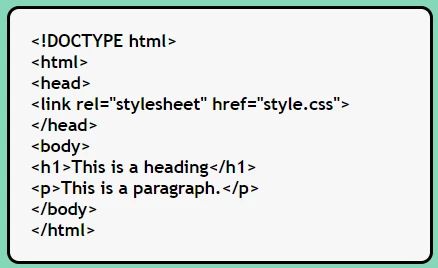
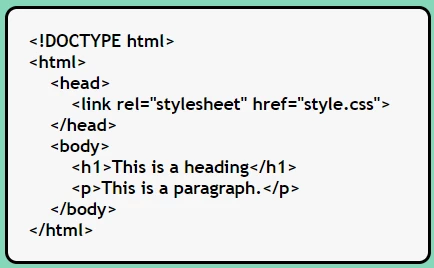
I am using pre code to display the webpage code but there is a top and bottom padding that is not correct. It should be 0px. It looks like a <br> space is there but is not.
Any ideas on how to fix?
<!DOCTYPE html>
<html>
<head>
<title>Display Code in Webpage </title>
<meta charset="utf-8">
<meta http-equiv="X-UA-Compatible" content="IE=edge">
<meta name="viewport" content="width=device-width, initial-scale=1">
<style>
@import url('https://fonts.googleapis.com/css2?family=Open+Sans&display=swap');
body {
background-color: #84d7ba;
margin: 0px;
padding: 0px;
}
.container {
display: flex;
flex-direction: column;
min-height: 100vh;
width: 100%;
padding: 0px;
margin: 0px;
}
p {
font-family: 'trebuchet ms', 'Open Sans', sans-serif;
font-size: 16pt;
font-weight: bold;
line-height: 1.3em;
text-align: left;
margin: 0px;
padding-top: 0px;
padding-right: 0px;
padding-bottom: 0px;
padding-left: 50px;
}
h1 {
color: #000000;
font-size: 250%;
font-weight: bold;
margin-top: 20px;
padding-top: 0px;
padding-right: 0px;
padding-bottom: 0px;
padding-left: 25px;
font-family: Georgia;
}
h2 {
color: #000000;
font-size: 180%;
font-weight: bold;
margin-top: 0px;
padding-top: 0px;
padding-right: 0px;
padding-bottom: 0px;
padding-left: 40px;
font-family: Georgia;
}
pre code {
display: block;
font-size: 110%;
font-weight: bold;
font-family: 'trebuchet ms', 'Open Sans', sans-serif;
background-color: #f7f7f7;
color: #000000;
border: 3px solid #000000;
padding-top: 0px;
padding-right: 0px;
padding-bottom: 0px;
padding-left: 20px;
margin-left: 40px;
margin-right: 0px;
margin-top: 0px;
margin-bottom: 0px;
width: 400px;
white-space: pre-wrap;
word-wrap: break-word;
border-radius: 12px;
}
</style>
</head>
<body>
<div class="container">
<h1>Display code in a Webpage</h1>
<h2> Code Snippetsof HTML & CSS:</h2>
<p><a href="https://mothereff.in/html-entities">HTML entity encoder/decoder</a> </p>
<pre>
<code>
<!DOCTYPE html>
<html>
<head>
<link rel="stylesheet" href="style.css">
</head>
<body>
<h1>This is a heading</h1>
<p>This is a paragraph.</p>
</body>
</html>
</code>
</pre>
</div>
</body>
</html>


 AdChoices