Participant
Jul 22, 2020 7:05 AM UTC
Answered

Pre-packaged snippets not viewing

Hi!


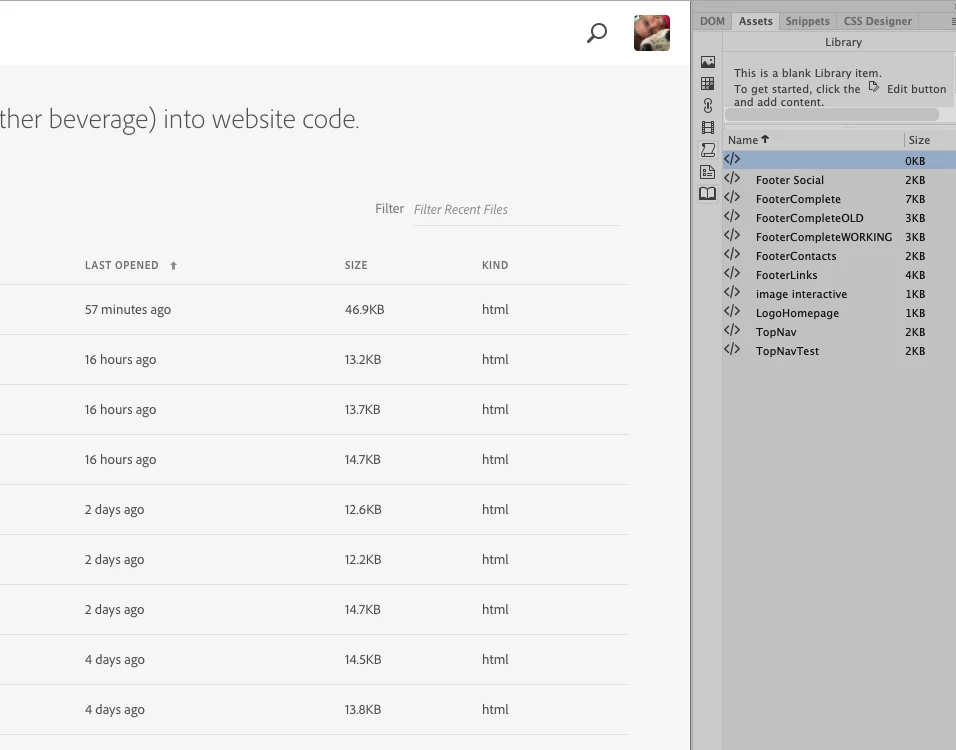
I am trying to get my DW to show the pre-packaged snippets but no luck, just the ones I created...


Any ideas? I am on a Mac, running DW 20.2

Thanks

Barbara


    This topic is closed to new replies. Start a new post to keep the conversation going.
    Nayan_Kankariya
    Nayan_KankariyaCorrect answer
    Adobe Employee
    Jul 22, 2020 8:46 AM UTC

    Hi Barbara,


    Pre-packaged or built-in snippets are available in Snippets panel.You can invoke Snippets panel from Window Menu --> Snippets.


    From the screenshot, we see that you are referring to Assets panel --> Library and Assets panel will display assets from your current site like images, colors, templates, library, scripts, media and URL's from your current site.


    Please let us know if you have any further queries on the same.


    Thanks,

    Nayan

    Dreamweaver Team

    4 replies

    Jon Fritz
    Community Expert
    Community Expert
    Jul 22, 2020 12:21 PM UTC

    All you should need to do is click the tab labeled Snippets in the top right of your screenshot.

    Translate
    Nayan_Kankariya
    Adobe Employee
    Nayan_KankariyaCorrect answer
    Adobe Employee
    Jul 22, 2020 8:46 AM UTC

    Hi Barbara,


    Pre-packaged or built-in snippets are available in Snippets panel.You can invoke Snippets panel from Window Menu --> Snippets.


    From the screenshot, we see that you are referring to Assets panel --> Library and Assets panel will display assets from your current site like images, colors, templates, library, scripts, media and URL's from your current site.


    Please let us know if you have any further queries on the same.


    Thanks,

    Nayan

    Dreamweaver Team

    Translate
    babi64Author
    Participant
    Jul 23, 2020 4:44 AM UTC

    Thanks Nayan!


    Got it... but how can I now "transfer" the many snippets I have created into a "Custom" folder without recreating them?


    Thanks again,

    Barbara

    Translate
    Nayan_Kankariya
    Adobe Employee
    Adobe Employee
    Jul 23, 2020 4:59 AM UTC

    Hi Barbara,


    All custom snippets should get migrated to the latest Dw version. Could you please let us know the current Dw version where you are not seeing the custom snippets. Can you provide a screenshot of Snippets panel where you have Custom folder. Also you can try below options to back-up the custom snippets.


    1. Copy the Snippets folder from the below location and store it in any of your backup folder location. Folder location: /Users/<username>/⁨Library⁩/Application Support/Adobe/Dreamweaver 2020/<locale>/Configuration/Snippets
    2. Sync snippets to cloud and this will allow to store snippets in Cloud as backup and also you can retrieve synced snippets to other devices with same Adobe ID logged in on all devices. Please go through the help page https://helpx.adobe.com/in/dreamweaver/using/synchronizing-dreamweaver-settings-creative-cloud.html for details.


    Thanks,

    Nayan

    Dreamweaver Team

    Translate