Participant
January 22, 2017
Answered

Preview in browser DreamWeaver 2017

  • January 22, 2017
  • 1 reply
  • 2203 views

Hi,

I downloaded DreamWeaver2017 but when I want to see what my code looks like in chrome it creates an other url..

For example I want to load my index.php :

It should be written

http://localhost/em3/applications/API/twigtest/index.php

But it's either
http://127.0.0.1:52515/preview/app/index.html

Or a temp

http://localhost/em3/applications/API/twigtest/TMP1jsjvuv.php

Does anyone have the solution to directly get the right url when I push f12?

Thank you and sorry for my english ^^

    This topic has been closed for replies.
    Correct answer Nancy OShea

    That is the new Real-Time/Device Preview feature.   It uses an Adobe URL.

    How to preview web pages in Dreamweaver

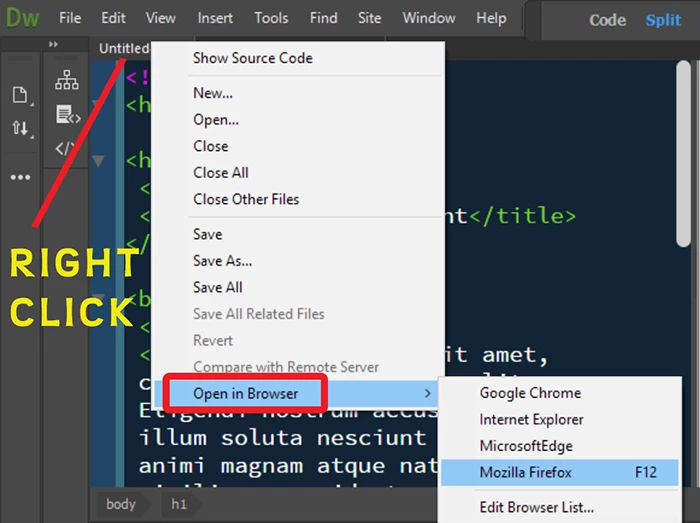
    To avoid that, right click on an open tab or a file in your Files Panel.

    Select Open in Browser.   Do not use F12.

    1 reply

    Nancy OShea
    Community Expert
    Nancy OSheaCommunity ExpertCorrect answer
    Community Expert
    January 22, 2017

    That is the new Real-Time/Device Preview feature.   It uses an Adobe URL.

    How to preview web pages in Dreamweaver

    To avoid that, right click on an open tab or a file in your Files Panel.

    Select Open in Browser.   Do not use F12.

    Nancy O'Shea— Product User & Community Expert
    darkcomaAuthor
    Participant
    January 22, 2017

    Thank you very much !

    It's just that I like to keep some links opened in my browser but the pages refresh when I want to work on other files..