


Known Participant
February 20, 2017
Answered

Problem with using italics

  • February 20, 2017
  • 1 reply
  • 512 views

I am almost done with this homepage, but I need to have two different paragraphs render as italic AND flush left, the type is flush left before I apply the italic property.  Once I apply the italic property, the type does become italic, but the first line of the paragraph becomes indented.  I have not been able to figure out where this is happening.

Anybody got any ideas?  The original copy in Word, was not indented. I just do not see anything that would cause this... maybe because I'm not sure what I'm looking for.

This topic has been closed for replies.
Correct answer Nancy OShea

Without seeing your code it's anybody's guess what may be going on.  But ordinarily, MS Word junk needs to be stripped out before you paste into HTML docs.

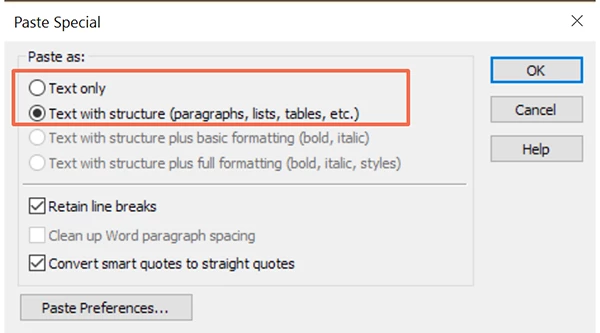
In Design View, always use Edit > Paste Special (Ctrl+Shift+V).  Paste as text only or text with structure. See screenshot.

For anything more than guesses, we need to see your code -- all of it.  A link to your online page is the best way to get help.

Nancy

1 reply

Nancy OShea
Community Expert
Community Expert
February 20, 2017

<em> tags do not in and of themselves change paragraph indents.  So the question is what are you doing to apply italic text to your paragraph?

A <blockquote> is the semantic tag used for quotations.  If you're using <blockquote> you'll need to adjust the styles in your custom stylesheet.

Nancy

Nancy O'Shea— Product User & Community Expert
Known Participant
February 20, 2017

All I did was place the copy between paragraph tags, select the type and in the CSS Designer I chose font-style and selected italics.

And it goes from being flush left to having a first line indent.  I don't have anything selected for text-indent.  I did not use <blockquote>.

Known Participant
February 20, 2017

Actually when I take this back to normal and nto italic, it still has the indent.  I really do not know what's happening.