Participant
May 17, 2025
Answered

Problems with domain when posting site

  • May 17, 2025
  • 2 replies
  • 365 views

I built a website and uploaded it on Bluehost. I have never done it before and needed chat support. After uploading instead of the domain i assigned, it was ending in /public_html. If I look under the regular domain, images are not uploaded. It only works on the /public_html.. DOes anyone know how to fix this?

    Correct answer Nancy OShea

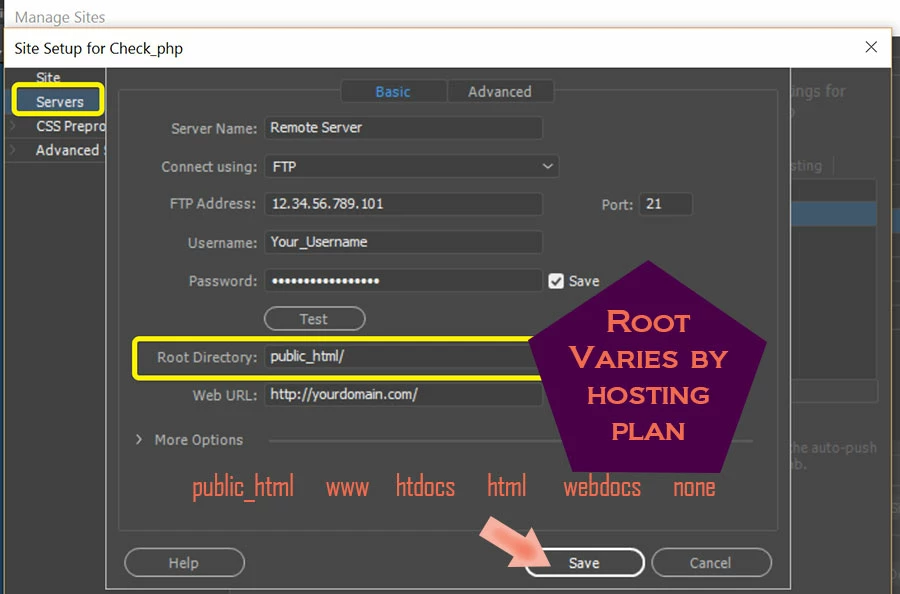
    /public_html/ is a virtual root directory used by many hosting providers.  It's for displaying publicly accessible files.  But it's not universal.  The root designation varies by hosting plan. Ask Bluehost which Root Directory your plan uses.


    See screenshot from Dreamweaver:


    I suspect you inadvertently created a public_html folder in your local site.  When you uploaded files to the server, it resulted in a duplicate entry.  example.com/public_html/index.html


    SOLUTION: move files from the duplicate folder to your server's root.

    Delete the duplicate folder.


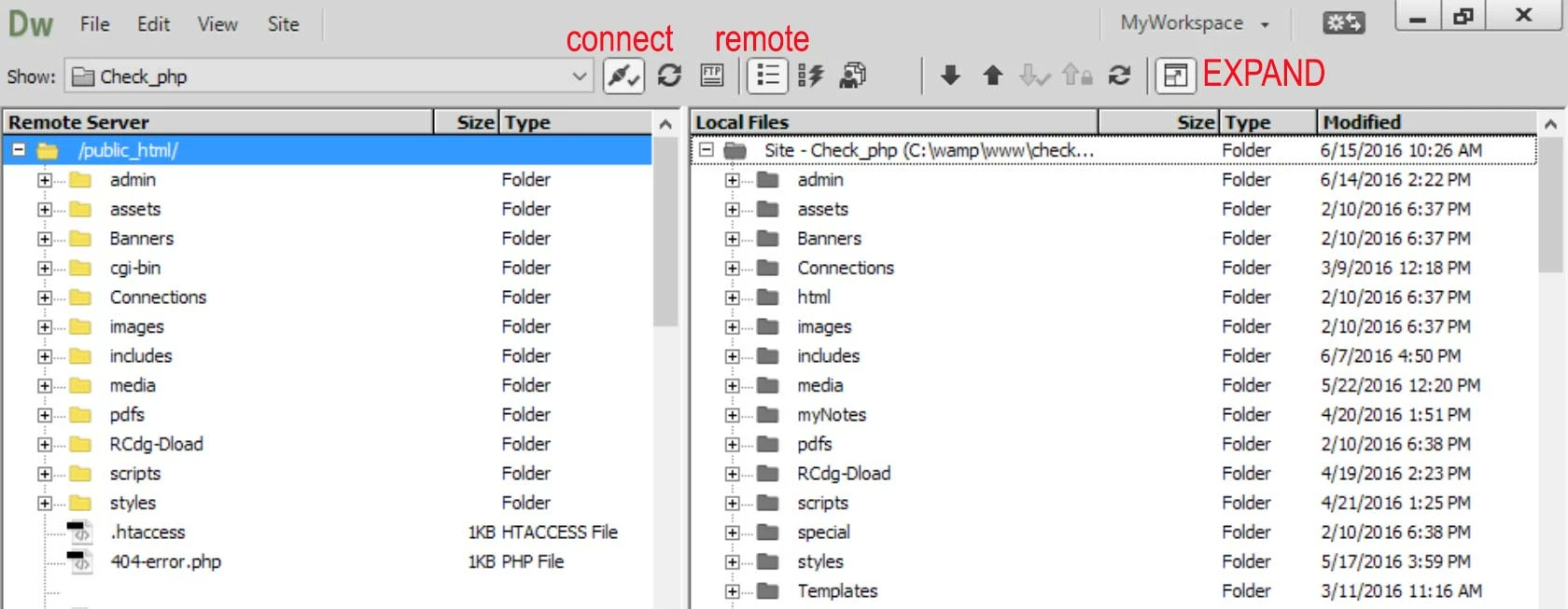
    When you're done, your expanded Files Panel should resemble this, Remote Server on the left, Local Files on the right,


    Hope that helps.


    2 replies

    Nancy OShea
    Community Expert
    Nancy OSheaCommunity ExpertCorrect answer
    Community Expert
    May 17, 2025

    /public_html/ is a virtual root directory used by many hosting providers.  It's for displaying publicly accessible files.  But it's not universal.  The root designation varies by hosting plan. Ask Bluehost which Root Directory your plan uses.


    See screenshot from Dreamweaver:


    I suspect you inadvertently created a public_html folder in your local site.  When you uploaded files to the server, it resulted in a duplicate entry.  example.com/public_html/index.html


    SOLUTION: move files from the duplicate folder to your server's root.

    Delete the duplicate folder.


    When you're done, your expanded Files Panel should resemble this, Remote Server on the left, Local Files on the right,


    Hope that helps.


    Nancy O'Shea— Product User & Community Expert
    Participant
    May 20, 2025

    Thank you very much. This had me bummed out. I hope I can get help from you in the future 🙂

    BenPleysier
    Community Expert
    Community Expert
    May 17, 2025

    This issue is likely due to the default behavior of Bluehost, where the primary domain is set to use the `public_html` directory for all website files. If the website is only working under `/public_html`, it suggests that the domain might not be correctly pointing to the right directory.


    A possible fix involves modifying the `.htaccess` file in the `public_html` folder to ensure that requests for the primary domain are correctly redirected to the appropriate subdirectory. This can be done by adding specific rewrite rules to the `.htaccess` file.


    Another approach is to check the document root settings in Bluehost's cPanel and ensure that the domain is correctly mapped to the right directory.


    Wappler is the DMXzone-made Dreamweaver replacement and includes the best of their powerful extensions, as well as much more!
    Nancy OShea
    Community Expert
    Community Expert
    May 17, 2025
    quote

    If the website is only working under `/public_html`, it suggests that the domain might not be correctly pointing to the right directory.


    By @BenPleysier

    =========

    Or the OP created & uploaded to a duplicate folder.

    site/public_html/ (root)

         public_html/ (sub-folder)

            index.html (landing page)


    This happens when users mistakenly add the server's root to their Local Site definition.


    Nancy O'Shea— Product User & Community Expert