
Participating Frequently
February 25, 2022
Question

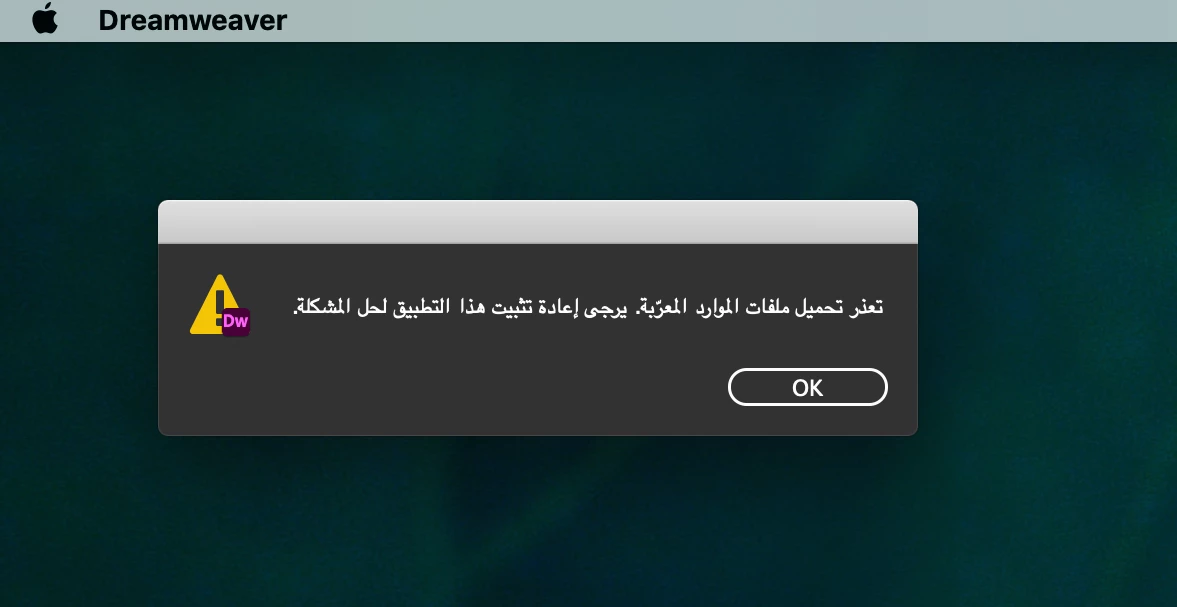
Problems with dreamweaver, error display in Arabic and impossible to work with the software

  • February 25, 2022
  • 4 replies
  • 1008 views

Good morning all,

I have had a problem for several days, I can no longer work on Dreamweaver, I usually use the software in French, but there a message in Arabic is displayed.
I attempted to uninstall the software and all cloud versions, then install again. But it doesn't work.
Someone would have any idea ?

Beautiful day

Lucie
    This topic has been closed for replies.

    4 replies

    Zaid Al Hilali
    Community Expert
    Community Expert
    February 27, 2022


    The Arabic message reads: "Arabized resources failed to load. You need to re-install this application to solve the problem".


    I doubt any Adobe application will show such message, and certainly not in Arabic. I have doubts that this version of Adobe Dreamweaver is not genuine (crack version), but I may be wrong.

    B i r n o u
    Legend
    February 27, 2022

    good point, so @LUCIE23330184bir4 where did you get the installer ? from the Adobe CC or elsewhere ?

    Participating Frequently
    February 28, 2022

    @B i r n o u 

    I used the cloud application window, which I open from the top right of my desktop.
    Do I no longer have to go through the Adobe site and my online account?

    Jon Fritz
    Community Expert
    Community Expert
    February 25, 2022

    What is the language set to in your CC Desktop App?

    1. Open the CC Dekstop App
    2. Go to File > Preferences
    3. Click on the Apps link in the side bar
    4. Verify the Default Language Install setting 
    5. If was set incorrectly, uninstall and reinstall DW

    Participating Frequently
    February 25, 2022

    In the CC application, it is well noted in French, moreover it is the only software that has encountered an alert message in Arabic.

    All other software is in French.

    B i r n o u
    Legend
    February 25, 2022

    when you resintall the app, are you preserving the prefs settings or downloading the one saved on cloud ?

    B i r n o u
    Legend
    February 25, 2022

    is there si any one, able to translate the message ?

    Participating Frequently
    February 25, 2022

    D'après une amie le message veut dire : Le téléchargement des ressources traduites en arabe a échoué. Merci de valider à nouveau l'application pour résoudre le problème.

    B i r n o u
    Legend
    February 25, 2022

    une fois les logiciels désinstallés, avez vous utilisez le cleaner tool

    https://helpx.adobe.com/creative-cloud/kb/cc-cleaner-tool-installation-problems.html


    avez vous la langue installée sur votre machine (swap clavier ou autre ?)

    Participating Frequently
    February 25, 2022

    Je n'ai pas utilisé le cleaner tool, il n y a pas de risque d'endommager les autres applications ?

    Mon ordinateur a plusieurs soucis depuis la tentative (échouée) de mise à jour sous Monterey, notamment Time Machine...

    Tous les autres logiciels adobe sont en français, il y a uniquement Dreamweaver qui pose problème.