
HealthEDoug
Participant
Feb 8, 2017 5:36 PM UTC
Question

Product Feedback: Press command key to see table structure

Hi there,

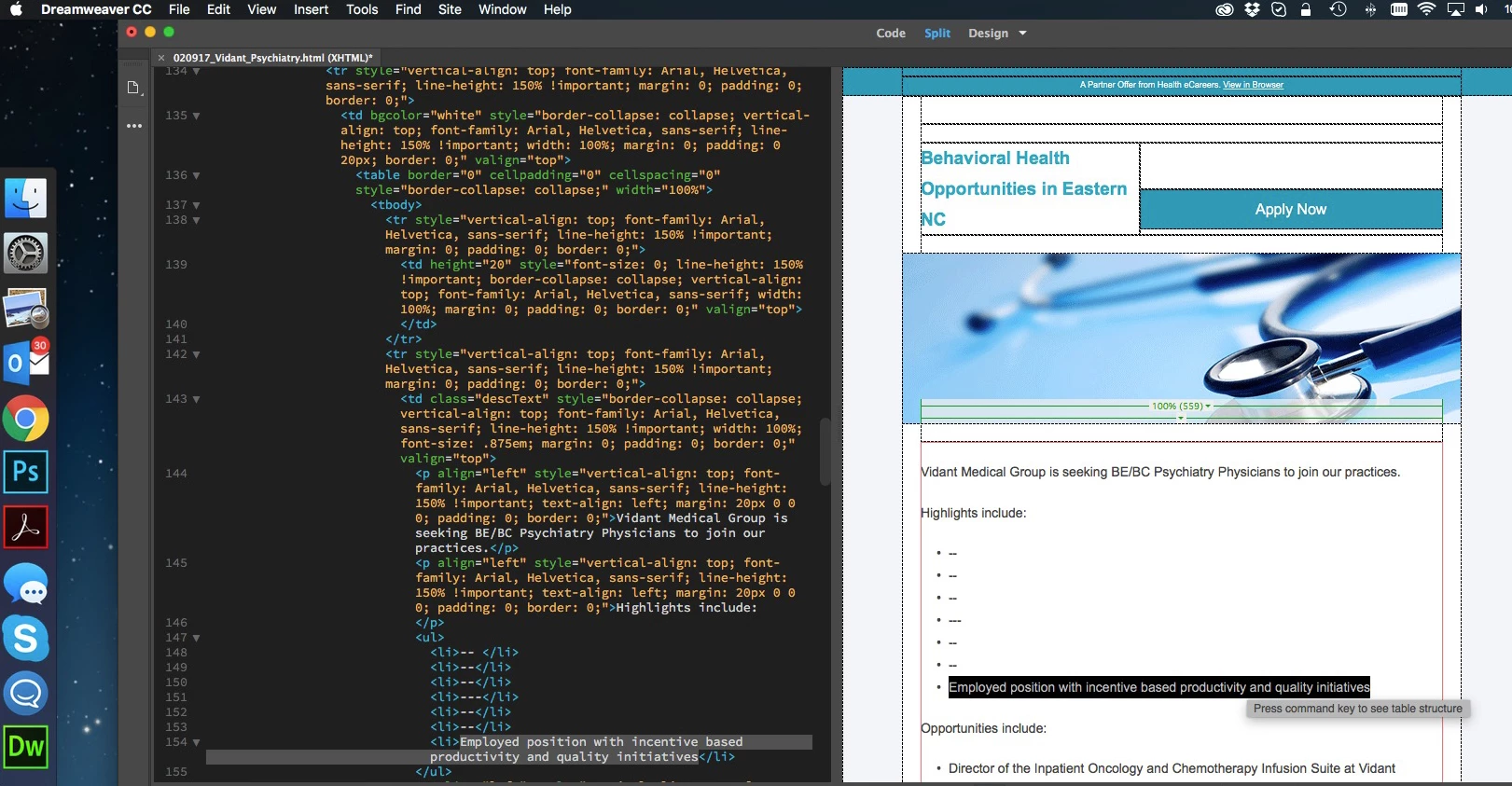
I'm not sure if this is a bug, but whenever I highlight text in the Design view there's pop-up ballon that tells me, "Press command key to see table structure." (See attached.)

I appreciate the tip, but it's very distracting to see this each time.

If there's a workaround to turn off those pop-ups I would love to know!

Thanks so much - all in all I really enjoy using Dw.

Doug
    This topic is closed to new replies. Start a new post to keep the conversation going.

    8 replies

    Participant
    Dec 13, 2023 10:12 PM UTC

    It's still doing this in 2023 -- is there a way to turn this off? It's the most annoying feature I've experienced.

    Translate
    Nancy OShea
    Community Expert
    Community Expert
    Dec 13, 2023 11:32 PM UTC

    Stop using table-based layouts. Use table-free HTML & CSS code. 


    If you're creating HTML emails, see below for supported features.

    https://www.caniemail.com/


    For those rare occasions when you really need a table for tabular data or spreadsheets, switch to LIVE view (Ctrl/Cmd + Shift + F11).


    Hope that helps.


    Translate
    Nancy O'Shea— Product User & Community Expert
    Participant
    Dec 14, 2023 3:31 PM UTC

    For email marketing you still need to use tables. Adobe should allow us to turn those off.

    Translate
    Jon Fritz
    Community Expert
    Community Expert
    Feb 8, 2017 5:55 PM UTC

    There's no way to turn that particular pop-up off that I've ever seen (it has been asked for many times in the forum) other than working from Live View instead of Design.

    The editor for tables is a bit different in Live, but it can be done and that nuisance tooltip doesn't exist there.

    Translate
    HealthEDoug
    Participant
    Feb 9, 2017 4:14 PM UTC

    Thanks, Jon!

    Translate
    Niharika Jha
    Adobe Employee
    Adobe Employee
    Feb 10, 2017 9:21 AM UTC

    Hi,

    Can you share the HTML file where you are seeing the tooltip popping up so that we can debug this at our end?

    Regards

    Niharika Gupta

    Translate