Hosun
Inspiring
July 25, 2019
Answered

pseudo element

  • July 25, 2019
  • 3 replies
  • 1197 views

Hi,

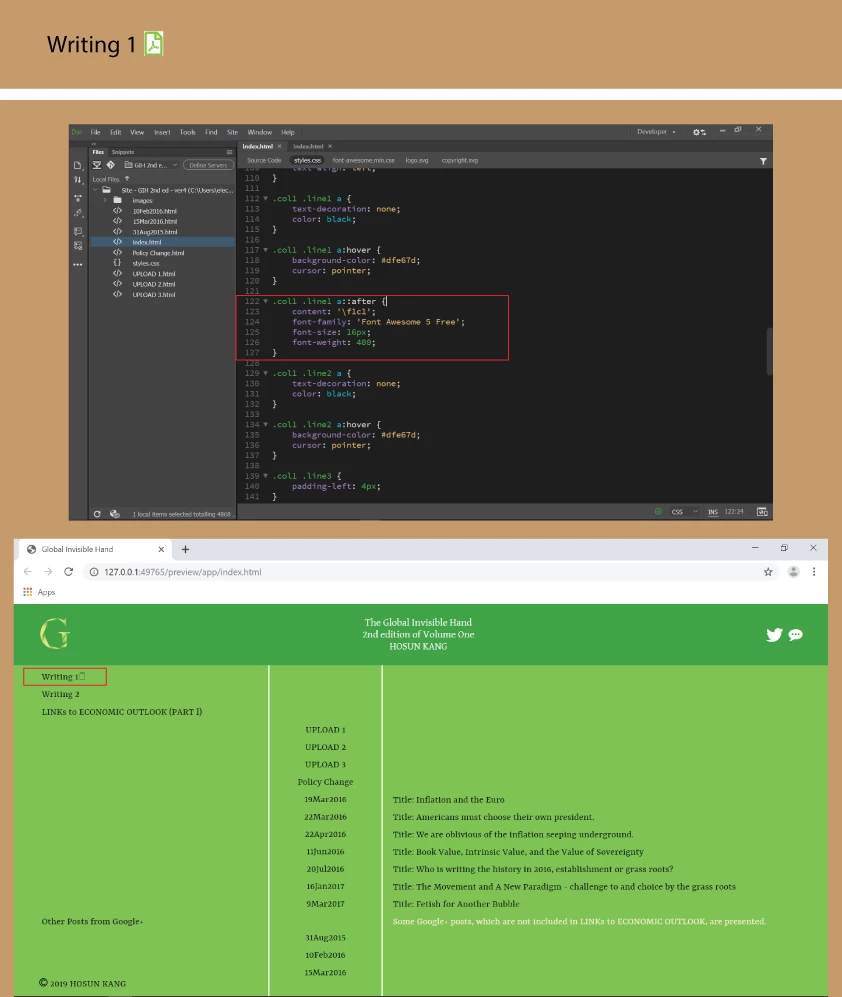
I want to add the pdf icon next to "Writing 1".

I wrote

.col1 .line1 a::after {

content: '\f1c1';

font-family: 'Font Awesome 5 Free';

font-size: 16px;

font-weight: 400;

}

But it doesn't work.

I added in <head>

<link rel="stylesheet" href="https://use.fontawesome.com/releases/v5.8.1/css/all.css" integrity="sha384-50oBUHEmvpQ+1lW4y57PTFmhCaXp0ML5d60M1M7uH2+nqUivzIebhndOJK28anvf" crossorigin="anonymous">

But two icons in <header> don't work.

How would I do?

Global Invisible Hand

Hosun Kang

This topic has been closed for replies.
Correct answer osgood_

If l remember correctly you have the font awesome  4 css library linked to your page not font awesome 5. I would just insert the tag much like you did for the Twitter icon using the font awesome 4 class for the pdf icon, which can be found by Googling font awesome 4 and then searching the icons on the website

3 replies

Legend
July 26, 2019

I just tested your original code using font-awesome 5 using your page code/links/css and it works for me, the pdf icon shows.

BenPleysier
Community Expert
Community Expert
July 25, 2019

I think that you should refine the style rules somewhat. Have a look at the following CSS

.pdf:after {

  font-family: FontAwesome;

  content: "\00a0\f1c1";

  padding-left: 4px;

}

The markup will look like:

<p class="pdf">Writing 1</p>

The end result:

Wappler is the DMXzone-made Dreamweaver replacement and includes the best of their powerful extensions, as well as much more!
BenPleysier
Community Expert
Community Expert
July 25, 2019

Just in case you want to link to a PDF file, the following may be of more interest:

a[href$=".pdf"]:after {

  font-family: FontAwesome;

  content: "\00a0\f1c1";

  padding-left: 4px;

}

The markup:

<a href="writing_1.pdf">Writing 1</a>

The result:

Wappler is the DMXzone-made Dreamweaver replacement and includes the best of their powerful extensions, as well as much more!
osgood_Correct answer
Legend
July 25, 2019

If l remember correctly you have the font awesome  4 css library linked to your page not font awesome 5. I would just insert the tag much like you did for the Twitter icon using the font awesome 4 class for the pdf icon, which can be found by Googling font awesome 4 and then searching the icons on the website

Nancy OShea
Community Expert
Community Expert
July 25, 2019

I agree with osgood.  Keep this simple.  Use the <i> tag as you did before with Twitter and e-mail icons. 

Nancy O'Shea— Product User & Community Expert
Legend
July 25, 2019

Another possibility why the code doesnt work could be that the pdf icon is classified as a brand in v5

Font Awesome 5 Brand instead of Font Awesome 5 Free however l couldnt check that or if the unicode was correct because the icon page on the awesome webpage doesnt work in andriod, just shows a blank page.

Either way l would stick to one workflow 4 or 5 and one implementation tag or css.