


Participating Frequently
September 24, 2017
Answered

Publishing Website | Root Directory not valid

  • September 24, 2017
  • 2 replies
  • 491 views

So I'm publishing my site to the Remote Server via FTP. However, its saying my site directors either invalid, non-existent or I don't have permission. The directors is straight from my Creative Cloud files. How would I change permission for this folder, as I know it exists and the directory isn't invalid> Thanks

This topic has been closed for replies.
Correct answer Nancy OShea

Go to Site > New Site or Manage Sites.

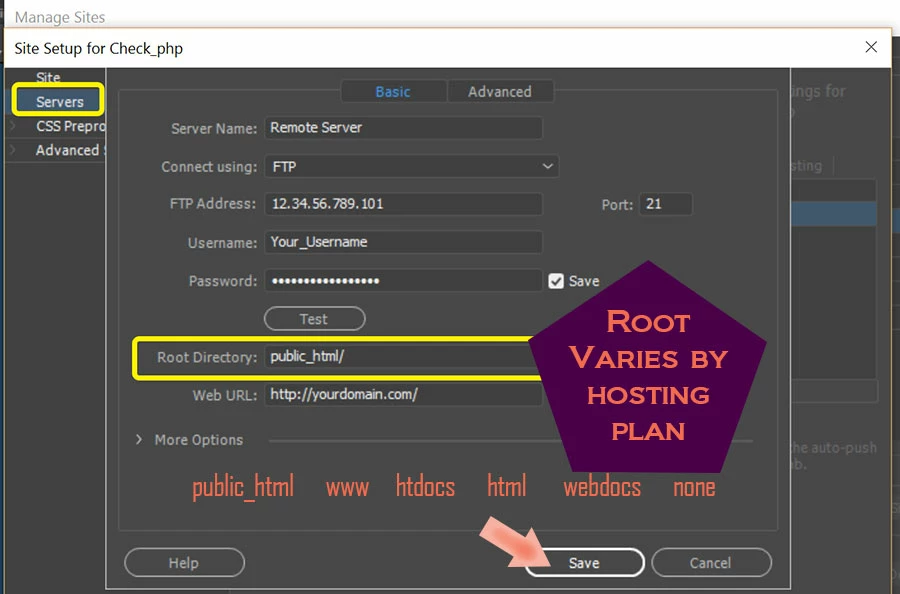
Enter your remote server's Root Directory where indicated in the screenshot below.

2 replies

Nancy OShea
Community Expert
Nancy OSheaCommunity ExpertCorrect answer
Community Expert
September 25, 2017

Go to Site > New Site or Manage Sites.

Enter your remote server's Root Directory where indicated in the screenshot below.

Nancy O'Shea— Product User & Community Expert
BenPleysier
Community Expert
Community Expert
September 24, 2017

Did you stipulate the correct root directory for the remote server? This is usually similar to www or httpdocs. You will need to check with the host.

Wappler is the DMXzone-made Dreamweaver replacement and includes the best of their powerful extensions, as well as much more!