Inspiring
Jan 23, 2017 4:45 PM UTC
Answered

Question on Icons

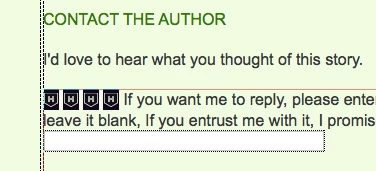
I'm new to DW so could someone please tell me what these strange icons are for (see screenshot - H inside a shield)?

Thanks

Alan
    This topic is closed to new replies. Start a new post to keep the conversation going.
    Jon Fritz
    Jon FritzCorrect answer
    Community Expert
    Jan 23, 2017 4:47 PM UTC

    Those are Design View's icon for Hidden Form Fields.

    You can change which Invisible Element icons you see under Edit > Preferences > Invisible Elements

    4 replies

    Nancy OShea
    Community Expert
    Community Expert
    Jan 23, 2017 4:56 PM UTC

    Shields denote the type of code.  In your case, it looks like HTML5.

    In my example, it's PHP code.

    Nancy

    Translate
    Nancy O'Shea— Product User & Community Expert
    Jon Fritz
    Community Expert
    Community Expert
    Jan 23, 2017 5:10 PM UTC

    While the small shield icons can denote the type of code being used (it's 1 of the 13 icons in Invisible Elements, specifically "visual server markup tags"), in the OP's case, they are denoting hidden form fields.

    That particular H icon appears when a form <input> has type="hidden"...

    Translate
    Inspiring
    Jan 24, 2017 4:44 PM UTC

    Thanks everyone.

    Alan

    Translate
    Jon Fritz
    Community Expert
    Jon FritzCommunity ExpertCorrect answer
    Community Expert
    Jan 23, 2017 4:47 PM UTC

    Those are Design View's icon for Hidden Form Fields.

    You can change which Invisible Element icons you see under Edit > Preferences > Invisible Elements

    Translate

