Participant
February 28, 2018
Answered

quitaron función /removed function

  • February 28, 2018
  • 1 reply
  • 443 views

hello good morning I have a problem with my work in DW it turns out that before last year's update I could select an area in my code and look for something in that part only now with this update from ccs6 to ccs they removed it or what happened I do not find it anymore, check all the forms in the replacement window, someone who knows what can be done or if it is no longer

hola buenos dias tengo un problema con mi trabajo en DW resulta que entes de la actualicion del año pasado podia seleccionar una area en mi codigo y buscar algo solo en esa parte no mas ahora con esta actualizacion del ccs6 a ccs la quitaron o que paso ya no la encuentro ya revise todas las formas en la ventana de remplazos alguien que sepa que se puede hacer o si ya no esta

This topic has been closed for replies.
Correct answer Jon Fritz

Are you looking for "Find in Selected Text"?

If that's the case, you use Ctrl + F and click the mystery icon next to the text field to make sure "Find in Selected Text" is chosen...

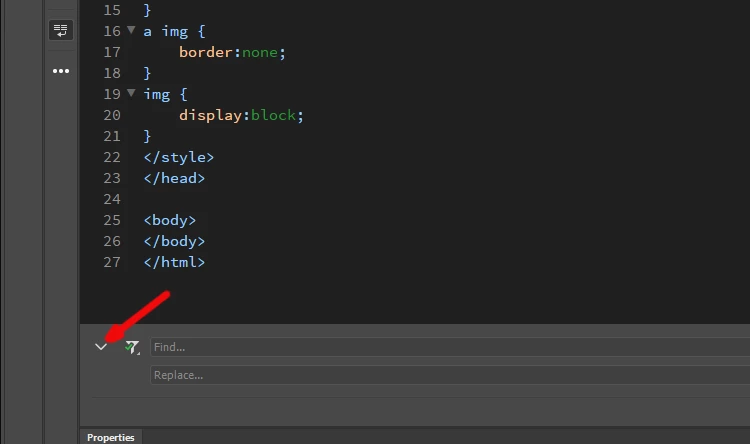
You then click the small arrow to get a Replace field added to the window...

...so you can enter replacement text.

1 reply

Jon Fritz
Community Expert
Community Expert
February 28, 2018

They changed the Find & Replace tool, there are now two of them.

Cmnd/Ctrl + F is now Find in Document

Cmnd/Ctrl + Shift + F is probably what you're looking for.

Participant
February 28, 2018

I think that if I already try this one that you mention but it does not have the function, that's why I doubt if it was removed or now it is in another sale.

Cmnd / Ctrl + Shift + F

Jon Fritz
Community Expert
Jon FritzCommunity ExpertCorrect answer
Community Expert
February 28, 2018

Are you looking for "Find in Selected Text"?

If that's the case, you use Ctrl + F and click the mystery icon next to the text field to make sure "Find in Selected Text" is chosen...

You then click the small arrow to get a Replace field added to the window...

...so you can enter replacement text.