Participating Frequently
June 10, 2019
Answered

Re: Responsive website [Branched]

  • June 10, 2019
  • 1 reply
  • 260 views

Thanks, I certainly will.  I have looked at a lot of the changes over the last year or so and knew that I was in for some huge changes.  That is why I was so worried that my skill level might be way too old.  It doesn't look good when ones website can't be used on a mobile device.  Can't wait for the book to get here!

This topic has been closed for replies.
Correct answer Nancy OShea

Pedricks  wrote

I was so worried that my skill level might be way too old.  It doesn't look good when ones website can't be used on a mobile device.  Can't wait for the book to get here!

I have branched this to a new discussion and moved it to the Dreamweaver support forum.

You don't need to wait for your book to arrive to get started with responsive web design  templates in DW CC.  Simply define your site folder as you did in previous versions.  Site > New Site.

Then go to File > New > Starter Templates.  Pick one and hit the Create button.   I'm  fond of Bootstrap because it cuts my development time in half.   But use whichever one appeals to you.  You can customize it later.
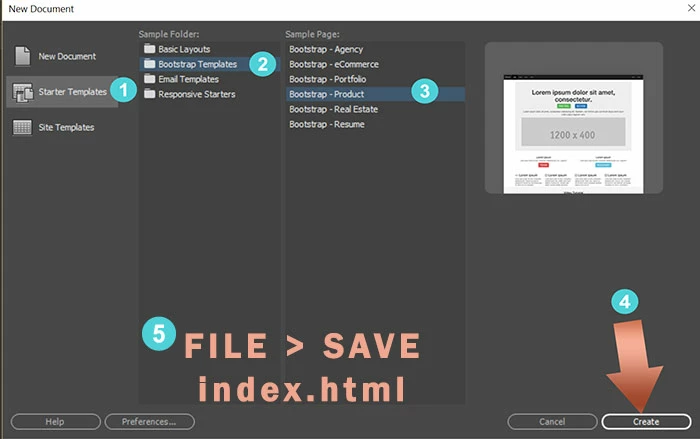
Immediately save your newly created document.  After saving, your Files panel will resemble this.
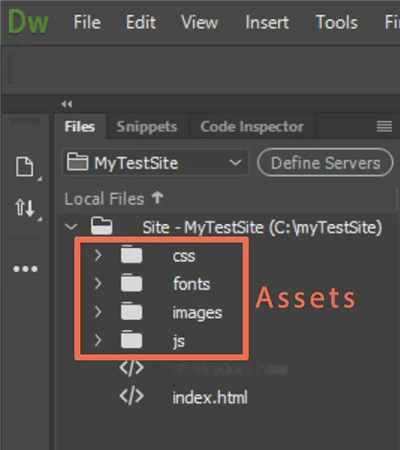
Have fun playing around with it.

1 reply

Nancy OShea
Community Expert
Nancy OSheaCommunity ExpertCorrect answer
Community Expert
June 10, 2019

Pedricks  wrote

I was so worried that my skill level might be way too old.  It doesn't look good when ones website can't be used on a mobile device.  Can't wait for the book to get here!

I have branched this to a new discussion and moved it to the Dreamweaver support forum.

You don't need to wait for your book to arrive to get started with responsive web design  templates in DW CC.  Simply define your site folder as you did in previous versions.  Site > New Site.

Then go to File > New > Starter Templates.  Pick one and hit the Create button.   I'm  fond of Bootstrap because it cuts my development time in half.   But use whichever one appeals to you.  You can customize it later.

Immediately save your newly created document.  After saving, your Files panel will resemble this.

Have fun playing around with it.

Nancy O'Shea— Product User & Community Expert
PedricksAuthor
Participating Frequently
June 10, 2019

Thanks!  I will do that!  Working two jobs right now, so strapped for time and this will help a lot.  Plus I live in an area with dismal internet and no cable.  Just ancient landlines.  I am lucky if I can 500kbps, so I have to drive into town if I want to watch video tutorials and such.  And update apps!