Participating Frequently
April 15, 2017
Answered

Realtime Preview and external CSS

  • April 15, 2017
  • 1 reply
  • 461 views

I can't seem to get Realtime Preview to use any updated css styles that are linked in an external css file. Live View updates with the new styles, but not Realtime Preview.

Realtime Preview respects the css in the external file for all that is unchanged, but any changes or additions are ignored.

It's like it's using a cached version of the old css file and won't let go of it.

Anyone have ideas or help?

Thanks

    This topic has been closed for replies.
    Correct answer Nancy OShea

    Try using a different browser.   Chrome is sticky about caching pages.

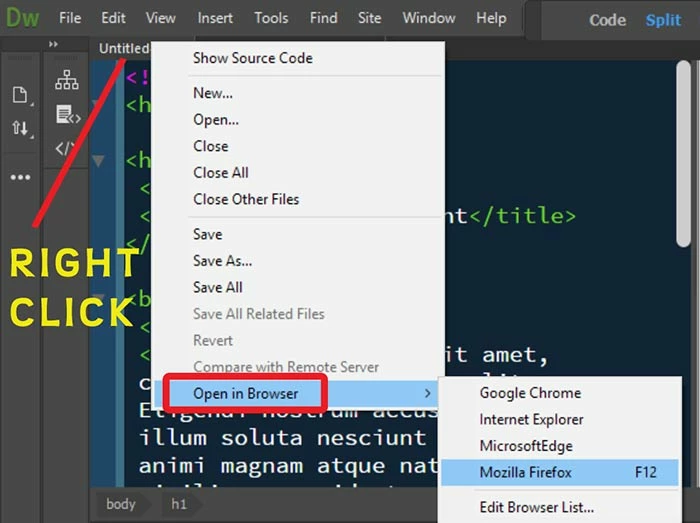
    Or don't use Real-Time Preview.  Use the ordinary Open in Browser method.  See screenshot.

    Nancy

    1 reply

    Nancy OShea
    Community Expert
    Nancy OSheaCommunity ExpertCorrect answer
    Community Expert
    April 15, 2017

    Try using a different browser.   Chrome is sticky about caching pages.

    Or don't use Real-Time Preview.  Use the ordinary Open in Browser method.  See screenshot.

    Nancy

    Nancy O'Shea— Product User & Community Expert
    Participating Frequently
    April 15, 2017

    Good call on the browser. It is indeed a Chrome only problem, apparently.

    I guess it's caching the css file, which would explain why old styles still update when I add them to a page, but new ones don't.

    (However, open in browser does not help this problem in Chrome.)

    Thanks much.

    Nancy OShea
    Community Expert
    Community Expert
    April 15, 2017

    You will need to manually clear your Chrome cache from time to time.   Or open Developer Tools and disable caching.    This only works when Developer Tools are open, though.

    https://www.technipages.com/google-chrome-how-to-completely-disable-cache

    For this reason, I use Firefox as my default browser.

    Nancy

    Nancy O'Shea— Product User & Community Expert