RigidCollision
Participant
Mar 7, 2022 10:32 AM UTC
Answered

REGEX find and replace not working

I am trying to use a regex to find and replace in Dreamweaver.
My Regex works fine in the 'find' section of the find and replace dialogue box.


<th style="[^"]*" class="[^"]*"

In various documentation I have seen the use of $ variables to take the result of the regex and use it in the replace section of the dialogue.

<th style="$2" class="$1"

I cannot get the replace working!

    This topic is closed to new replies. Start a new post to keep the conversation going.
    L e n aCorrect answer
    Community Expert
    Mar 7, 2022 12:50 PM UTC

    I notice three possible errors in your initial expression.


    First of all, you have to remove the string portion "<th " from the regular expression and ask DW to perform the search within the TH tag

     

    Secondly, the error comes from the fact that your query is composed of a single string that will necessarily return only one result.
    In fact, written like this, the words style and class are an integral part of your search, so you must isolate the pseudo values that would be assigned to them in order to consider them as the groups we are looking for.
    The use of parentheses is therefore necessary to materialize this isolation.
    So, instead of using the pattern


    style="[^"]*" class="[^"]*"


    It is therefore necessary to write


    style="([^"]*)" class="([^"]*)"


    This will give you the two returns distinctly identifiable by $1 and $2


    Finally, this pre-request assumes that the two parts of the string are necessarily written in this order (style... then class..., and not class... then style....). For this reason, we will say that this is the case, and hope (for now) that it is the way it is.

    But we also assume that the two parts are separated by only one space. This can be corrected by slightly modifying the query, and adding a [ ]*


    So, instead of writing


    style="([^"]*)" class="([^"]*)"


    we can write


    style="([^"]*)"[ ]*class="([^"]*)"


    So, as a result, for the final REGEX in the search field you can write


    style="([^"]*)"[ ]*class="([^"]*)"


    And in the replacement field


    style="$2" class="$1"
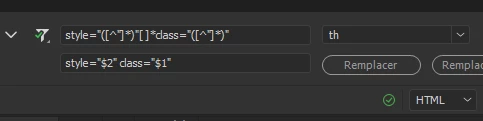
     

    My English being what it is, I imagine that my explanations may not be very clear, but the code should work. Anyway, don't hesitate.


    3 replies

    L e n aCommunity ExpertCorrect answer
    Community Expert
    Mar 7, 2022 12:50 PM UTC

    I notice three possible errors in your initial expression.


    First of all, you have to remove the string portion "<th " from the regular expression and ask DW to perform the search within the TH tag


    Secondly, the error comes from the fact that your query is composed of a single string that will necessarily return only one result.
    In fact, written like this, the words style and class are an integral part of your search, so you must isolate the pseudo values that would be assigned to them in order to consider them as the groups we are looking for.
    The use of parentheses is therefore necessary to materialize this isolation.
    So, instead of using the pattern


    style="[^"]*" class="[^"]*"


    It is therefore necessary to write


    style="([^"]*)" class="([^"]*)"


    This will give you the two returns distinctly identifiable by $1 and $2


    Finally, this pre-request assumes that the two parts of the string are necessarily written in this order (style... then class..., and not class... then style....). For this reason, we will say that this is the case, and hope (for now) that it is the way it is.

    But we also assume that the two parts are separated by only one space. This can be corrected by slightly modifying the query, and adding a [ ]*


    So, instead of writing


    style="([^"]*)" class="([^"]*)"


    we can write


    style="([^"]*)"[ ]*class="([^"]*)"


    So, as a result, for the final REGEX in the search field you can write


    style="([^"]*)"[ ]*class="([^"]*)"


    And in the replacement field


    style="$2" class="$1"


    My English being what it is, I imagine that my explanations may not be very clear, but the code should work. Anyway, don't hesitate.

    Translate
    RigidCollision
    Participant
    Mar 7, 2022 9:50 PM UTC

    Lena,

    Thank you for the reply. Your explanation is incredibly useful and makes a lot of sense. I very much appreciate you taking time to explain.

    I am now implementing correct REGEX search and replace functionality and using it to tidy up and maintain my code.

    Much appreciated.

    Kind regards

    Translate
    Community Expert
    Mar 8, 2022 9:43 AM UTC

    Thanks for your reply, I'm glad that it helped you !

    Translate