
Answered
remove dreamweaver 2020 design view tag attribute editor
How do I remove this blue attribute editor from the design view? Thank you for any hints.
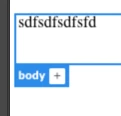

How do I remove this blue attribute editor from the design view? Thank you for any hints.
That's actually the new-ish Live View Editor.
Design View doesn't have the blue outlines and tabs (called Live View Displays). You can switch from Live View to the old Design View in the Document Toolbar, found under Window > Toolbars > Document (make sure it is checked).
If you want to continue using Live View, without the displays, you can turn them off when Live View is active, under View > Live View Options > Hide Live View Displays.
Already have an account? Login
Enter your E-mail address. We'll send you an e-mail with instructions to reset your password.


 AdChoices