


Inspiring
August 18, 2023
Answered

Removing Site Name in Dreamweaver.

  • August 18, 2023
  • 2 replies
  • 456 views

Ive just started using Dreamweaver. However I ran into a problem when building a site, so I started from scratch. I deleted the index file in my root folder ok, but when I try to start a new site I'm informed that the root folder is alredy being referenced. I could change the root folder name or edit the registry  references but is there any other solution that can completely remove the sie name and reference to the root folder.

    This topic has been closed for replies.
    Correct answer Nancy OShea

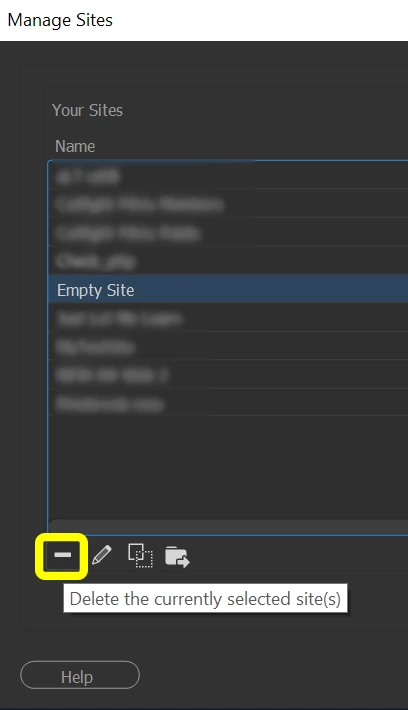
    Go to Site > Manage Sites.  You will be presented with a list of Site Definitions. 

    Highlight the sites you wish to delete and hit the minus (-) icon.


    Hope that helps.


    2 replies

    Nancy OShea
    Community Expert
    Nancy OSheaCommunity ExpertCorrect answer
    Community Expert
    August 18, 2023

    Go to Site > Manage Sites.  You will be presented with a list of Site Definitions. 

    Highlight the sites you wish to delete and hit the minus (-) icon.


    Hope that helps.


    Nancy O'Shea— Product User & Community Expert
    Jon Fritz
    Community Expert
    Community Expert
    August 18, 2023

    DW's just trying to keep you orgainized, and keep you from accidentally duplicating sites and creating all kinds of problems within the program with asset management.

    Each site needs its own root folder somewhere on your local machine. You can keep all of your sites in a MySites folder if you like (or within the htdocs folder of a local testing server installation), but each individual site you create with DW will need to be in its own unique root folder within MySites, for example...

    MySites
        Site1
            index.html
        Site2
            index.html
        Site3
            etc...

    Deleting the index.html page from a Defined Site doesn't delete the Site Definition from the program. DW still thinks you have a site using the same folder you're trying to use in your second Site Definition. If you don't want the old site anymore, go to Site > Manage Sites, highlight the old site and click the "Delete Currently Selected Site" button (the minus icon in the bottom left).

    Doing that will delete the site from DW, but won't touch any of your actual files or folders. It just breaks the associations DW created with that folder and any files stored within it.