
Inspiring
December 28, 2018
Answered

Replace few words/classes in live time - shortcut?

  • December 28, 2018
  • 1 reply
  • 635 views

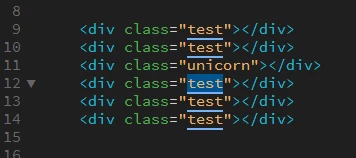
Hi there, I know that there was some shortcut in DW to replace same words/classes. When I highlight some word then DW make all same words underline. Can't find the shortcut that edit them in live time. Not "ctrl+h" there was something else...

This topic has been closed for replies.
Correct answer Jon Fritz

Another option, if things aren't as nice and lined up as you have showing now, would be to highlight the class, so multiple copies of the class become underlined, then hit Ctrl + Shift + F3 to select all of them. You can then replace every copy at once, no matter where they appear.

1 reply

Nancy OShea
Community Expert
Community Expert
December 28, 2018

For multi-line editing, use ALT key to highlight the class name "text". 

Then type a new class name called spin.

Results of multi-line editing.

Nancy O'Shea— Product User & Community Expert
BryanPSAuthor
Inspiring
December 29, 2018

Thanks! This is what I need

Jon Fritz
Community Expert
Jon FritzCommunity ExpertCorrect answer
Community Expert
January 3, 2019

Another option, if things aren't as nice and lined up as you have showing now, would be to highlight the class, so multiple copies of the class become underlined, then hit Ctrl + Shift + F3 to select all of them. You can then replace every copy at once, no matter where they appear.