
Inspiring
May 16, 2020
Question

required popup on form - mobile how to style it?
  • May 16, 2020
  • 3 replies
  • 2035 views

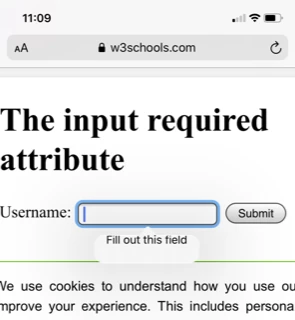
 On mobile devices the 'required popup panel' photo above the text is not centred correctly - its ok on a desktop computer. Not sure how to access this via CSS to correct alignment test error ??


<!DOCTYPE html>
<html>
<body>

<h1>The input required attribute</h1>

<form action="/action_page.php">
<label for="username">Username:</label>
<input type="text" id="username" name="username" required>
<input type="submit">
</form>

</body>
</html>


Hope you can help?


Tim


    This topic has been closed for replies.

    3 replies

    BenPleysier
    Community Expert
    Community Expert
    May 16, 2020

    Adding to the other two replies, you could always use the Bootstrap library, this will save a lot of time and anguish.

    Wappler is the DMXzone-made Dreamweaver replacement and includes the best of their powerful extensions, as well as much more!
    Nancy OShea
    Community Expert
    Community Expert
    May 16, 2020

    Don't sweat the small stuff you can't control.  Form styles in general are controlled by the browser's internal programming.  Each browser styles them differently as shown in my screenshot.


    Nancy O'Shea— Product User & Community Expert
    Legend
    May 16, 2020

    I dont think you can alter the position, 'required' is baked into the browser l believe. You have much more control if you build your own validation.


    Edited: On investigation looks like you can style the 'required' form attribute. Ive never tried it but just google, it looks reasonably simple to implement but how effective it is cross browser l have no idea.


    Edited: No, after making some tests it appears you can only style the input field associated with the 'required' attribute but not change the appearance of the bubble pop-up, that is handled by each particular browser.