markl64039061
Participant
December 11, 2016
Answered

Rollback from DW 2017 to 2015?

  • December 11, 2016
  • 2 replies
  • 860 views

Anyone have any idea how to rollback?

I really can't use this DW 2017... 2015 was almost perfect... the Find & Replace is 'broken'.. or i just don't know how to use this new version anymore. Previously replacing code in multiple files in folders was as easy as opening up DW, select Find & Replace, enter code to find and code to replace, then REPLACE. It was as simple as that.

    This topic has been closed for replies.
    Correct answer mytaxsite

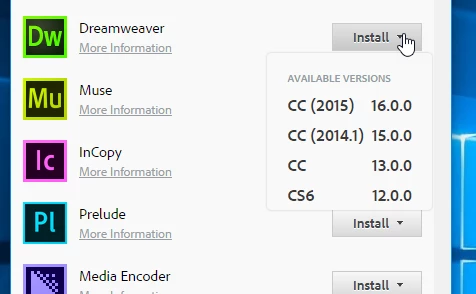
    If you have uninstalled the previous version then you can install the previous version by launching your CC APP and then under Dreamweaver look for something like this:

    In the above list I have 4 different versions available for me to download and install automatically.  Please make sure you choose the Advance option when you install it so that you can uncheck to uninstall the current versions on your system.  You don't want to remove them unless you are short of disk space.  These days HDs are very cheap and so space should not be a limiting factor.

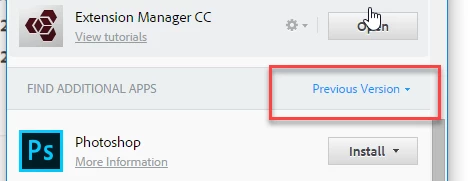
    If you don't see the previous versions in the APP then you may need to expand the Previous version tab as shown in this picture:

    Hope this helps.

    2 replies

    bernardf91190278
    Participant
    January 4, 2017

    I'm having trouble rolling back Dreamweaver 2017 to 2015.  Using Windows 10. 2017 is uninstalled.  The CC app doesn't have the older version dropdown that you show and immediately starts 2017 installation.

    Am I going about it the wrong way?

    BenPleysier
    Community Expert
    Community Expert
    January 4, 2017
    Wappler is the DMXzone-made Dreamweaver replacement and includes the best of their powerful extensions, as well as much more!
    bernardf91190278
    Participant
    January 4, 2017

    Thank you!

    mytaxsite
    mytaxsiteCorrect answer
    Inspiring
    December 11, 2016

    If you have uninstalled the previous version then you can install the previous version by launching your CC APP and then under Dreamweaver look for something like this:

    In the above list I have 4 different versions available for me to download and install automatically.  Please make sure you choose the Advance option when you install it so that you can uncheck to uninstall the current versions on your system.  You don't want to remove them unless you are short of disk space.  These days HDs are very cheap and so space should not be a limiting factor.

    If you don't see the previous versions in the APP then you may need to expand the Previous version tab as shown in this picture:

    Hope this helps.

    markl64039061
    Participant
    December 11, 2016

    Thank you sir! You're the best!