


Participant
Jan 5, 2021 2:19 AM UTC
Answered

Save and Live View Issues

Two things.

1) I get a JavaScript error everytime I try to save.
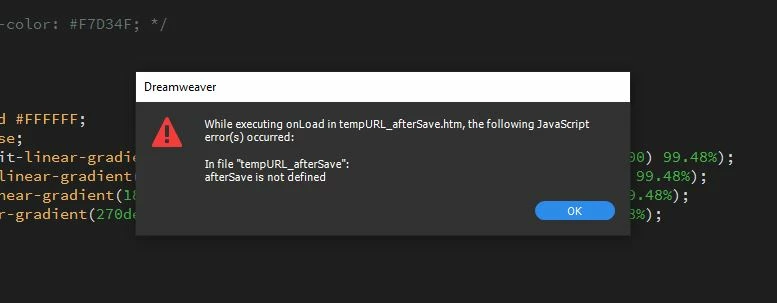
2) Live View no longer works.  It will show as an option but will not switch over from design view.  There is also a DUMMY button on the right side of the screen.  When you hover over it it says "Switch to Live View" and will not change when clicked.  

I have been a paying customer of this product for years and have recently found that every year as updates come out the product continues to fail.  There is no reason for these issues to continue as consecutive as they have been.  You owe it to all subscribers to be better, do better and provide a service that is better.

What are the fixes to these issues?  

    This topic is closed to new replies. Start a new post to keep the conversation going.
    BenPleysier
    BenPleysierCorrect answer
    Community Expert
    Jan 5, 2021 3:57 AM UTC

    Go to https://helpx.adobe.com/au/dreamweaver/kb/troubleshoot-javascript-errors-dreamweaver-cs6-cc.html#:~:text=Common%20causes%20of%20JavaScript%20errors,a%20bad%20installation%20of%20Dreamweaver and read the chapter on Delete FileCache.dat files from the Dreamweaver user configuration folder.

    Wappler is the DMXzone-made Dreamweaver replacement and includes the best of their powerful extensions, as well as much more!

    5 replies

    Nancy OShea
    Community Expert
    Community Expert
    Jan 5, 2021 7:47 PM UTC

    Hi @CESweb,

    Is your local site folder defined in DW?

    Does your site folder reside on the primary hard drive and not a cloud or network drive?

    Are you able to save files to same location from other apps?


    Translate
    Nancy O'Shea— Product User & Community Expert
    CESwebAuthor
    Participant
    Jan 7, 2021 12:53 AM UTC

    Hi Nancy,

    Yes local site folder is defined in DW.

    Yes site folder is on primary hard drive.

    Yes i am able to save to the same folder and on other apps.  This is the only application I have problems with over the past 2 years.

    Translate
    Nancy OShea
    Community Expert
    Community Expert
    Jan 7, 2021 6:28 PM UTC

    Sounds like a corrupted installation. If you continue to have problems, do the following:

    1. Use Adobe's Cleaner tools to wipe old files off your system. 

    https://helpx.adobe.com/creative-cloud/kb/cc-cleaner-tool-installation-problems.html

    2. Restart computer. 

    3. Download and install the latest versions of Creative Cloud desktop app followed by Dreamweaver, etc...

    https://helpx.adobe.com/download-install/kb/creative-cloud-desktop-app-download.html


    Post back if you still need help.


    Translate
    Nancy O'Shea— Product User & Community Expert
    BenPleysier
    Community Expert
    BenPleysierCommunity ExpertCorrect answer
    Community Expert
    Jan 5, 2021 3:57 AM UTC
    Wappler is the DMXzone-made Dreamweaver replacement and includes the best of their powerful extensions, as well as much more!
    CESwebAuthor
    Participant
    Jan 7, 2021 1:12 AM UTC

    Ben,

    Thanks for the assist.  Deleting the file gave me live back and I have not seen the save error yet.  

    The only other question I have is why can't i select a custom css file in the CSS Designer while I am editing the file under Source Code.  I have to selected the linked css file then it will allow me to edit the css in CSS Designer?? 

    Translate