Participant
November 19, 2017
Answered

Scaling of Dreamweaver CS6 in Windows 10 does not work

  • November 19, 2017
  • 4 replies
  • 1321 views

I have an issue using Dreamweaver CS6 in Windows 10: The scaling of the annotation, menus and especially the property field does not work. The text and all items are displayed so small that the application becomes useless. I changed the "Scale and Layout" setting in the Windows 10 Display setting menu but this did not help the matter (even after re-starting the computer, as suggested).

Does anyone have a solution for this issue? I would appreciate any help with this matter.

Thanks very much in advance,

Werner

    This topic has been closed for replies.
    Correct answer Nancy OShea

    Close Dreamweaver.

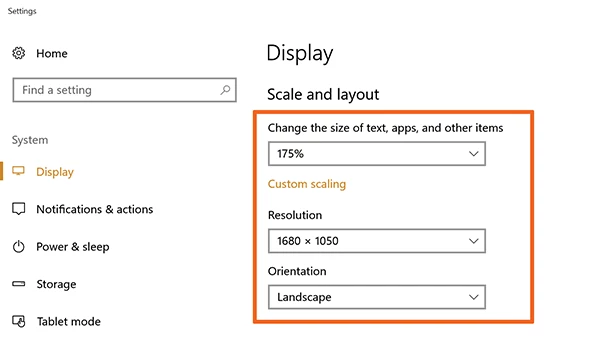
    Go to Windows Start Menu and type Display Settings in the search bar.   See screenshot.

    4 replies

    Community Manager
    November 20, 2017

    Latest DW CC 2018 has High DPI support. Worth giving a try.

    Nancy OShea
    Community Expert
    Nancy OSheaCommunity ExpertCorrect answer
    Community Expert
    November 19, 2017

    Close Dreamweaver.

    Go to Windows Start Menu and type Display Settings in the search bar.   See screenshot.

    Nancy O'Shea— Product User & Community Expert
    BenPleysier
    Community Expert
    Community Expert
    November 19, 2017

    Not sure if this will help How best to change your display settings in Windows 10 - CNET.

    It comes down to the fact that CS6 is not Hi-Res compatible.

    In case my guess regarding a hi-res screen is wrong, you may have a look at the windows setting regarding the font size and bring that back to 100%.

    Wappler is the DMXzone-made Dreamweaver replacement and includes the best of their powerful extensions, as well as much more!
    Community Manager
    November 19, 2017

    Hi,

    Could you please post the snapshots of the issue.

    Also, What is the Dreamweaver version you are using.

    Thanks