Inspiring
March 23, 2017
Answered

Search CTRL-F question/comment

  • March 23, 2017
  • 2 replies
  • 1083 views

When I hit CTRL-F it opens the search tool, as it should.

Many times, I want to search all selected files, or the entire site...the frustration is, the search requires you to have a page open, even if it's not related to the search.

Not sure why you can't search without having to first open a random webpage...seems like bad UX

The proper behavior (I would think) should be: when a user hits CTRL-F the program looks to see if a webpage is open, and if not, open a search dialog with the "current page", "open documents" options grayed out...

Having to open a page (any page) just to do a folder or site search is bizarre to me...

    This topic has been closed for replies.
    Correct answer Nancy OShea

    It may be bizarre, but it''s not a deal breaker for me since I always have at least one document open anyway.

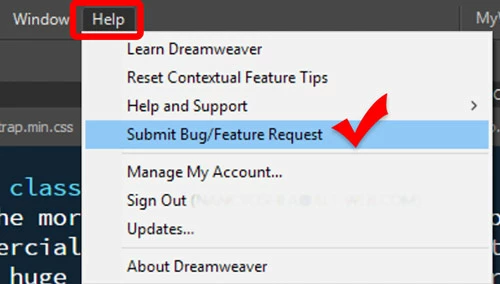
    Feel free to submit a feature request from the Help menu.

    Nancy

    2 replies

    Niharika Jha
    Adobe Employee
    Adobe Employee
    May 12, 2017

    Hi,

    As per the new update of Dw CC 2017.1, we have introduced the Advance Find and Replace dialog to search in Site, open documents etc. so even if you don't have any documents and you invoke the dialog via shortcut-Ctrl+Shift+F or menu Find->Find and Replace in Files, the dialog opens up with "Entire Current Local Site" selected by default in Find in dropdown and you can carry on your search operation from there.

    Regards,

    Niharika Gupta

    Adobe Dreamweaver

    Nancy OShea
    Community Expert
    Nancy OSheaCommunity ExpertCorrect answer
    Community Expert
    March 23, 2017

    It may be bizarre, but it''s not a deal breaker for me since I always have at least one document open anyway.

    Feel free to submit a feature request from the Help menu.

    Nancy

    Nancy O'Shea— Product User & Community Expert
    Inspiring
    March 23, 2017

    No, it's not a deal breaker for me either...when you first open dreamweaver, there's not always an open document. And in terms of UX, I think it should work with nothing open....I'll submit it....

    Inspiring
    March 23, 2017

    This was already there - with over 30 votes....At least I'm not the only one ;-)