jeffreyp64846165
Inspiring
May 24, 2017
Answered

Search/Replace Nested Tags

  • May 24, 2017
  • 1 reply
  • 327 views

Is it possible to search and replace a tag based upon its parent tag?

Specifically, I'm editing tables, and I have a bunch where all of the head content (between the <thead> and </thead> tags) is tagged <td>, when I really need it to be <th>.

It's not as simple as just replacing all of the <td> tags. I only want to replace the ones inside the <thead>.

Maybe it's a regular expression, but dang if I can figure it out.

This topic has been closed for replies.
Correct answer Jon Fritz

If you have DW CC2017.1 or a version prior to 2017.0, you could do a Find in Tag...

1. In CC2017, hit Ctrl + Shift +F to get the real Find window open
2. Click the Advanced Tab
3. Under "Find In", set "Current Document" (should test to make sure it works as expected first)
4. Set the next field to "td" (to the right of the Find In field)
5. If it's not already set to "Inside Tag", change the dropdown, then set the next field to "tr"
6. Hit the + icon to create another line
7. In that line, select "Inside Tag" from the left dropdown
8. Set "thead" in the second dropdown
9. For the "Action", choose "Change Tag"
10. For "To:" set it to "th"

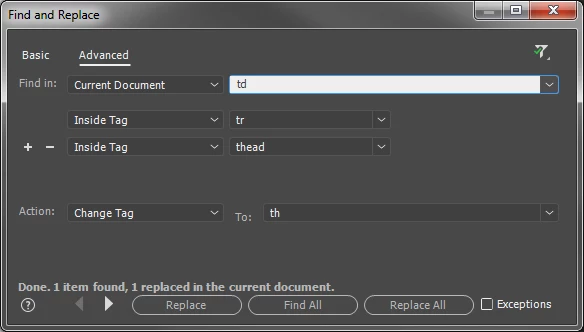
This will change any <td> within a <tr> within a <thead> to a <th>

1 reply

Jon Fritz
Community Expert
Jon FritzCommunity ExpertCorrect answer
Community Expert
May 24, 2017

If you have DW CC2017.1 or a version prior to 2017.0, you could do a Find in Tag...

1. In CC2017, hit Ctrl + Shift +F to get the real Find window open
2. Click the Advanced Tab
3. Under "Find In", set "Current Document" (should test to make sure it works as expected first)
4. Set the next field to "td" (to the right of the Find In field)
5. If it's not already set to "Inside Tag", change the dropdown, then set the next field to "tr"
6. Hit the + icon to create another line
7. In that line, select "Inside Tag" from the left dropdown
8. Set "thead" in the second dropdown
9. For the "Action", choose "Change Tag"
10. For "To:" set it to "th"

This will change any <td> within a <tr> within a <thead> to a <th>

jeffreyp64846165
Inspiring
May 24, 2017

Perfect! Thanks. (And it's been there all along.)

I didn't have to have the "Inside Tag: tr" selected. It found the td tags fine with just "Inside Tag: thead" selected.