Participant
August 22, 2022
Answered

Sections and Articles

  • August 22, 2022
  • 2 replies
  • 569 views

How do I create sections and articles in Dreamweaver?

    This topic has been closed for replies.
    Correct answer Nancy OShea

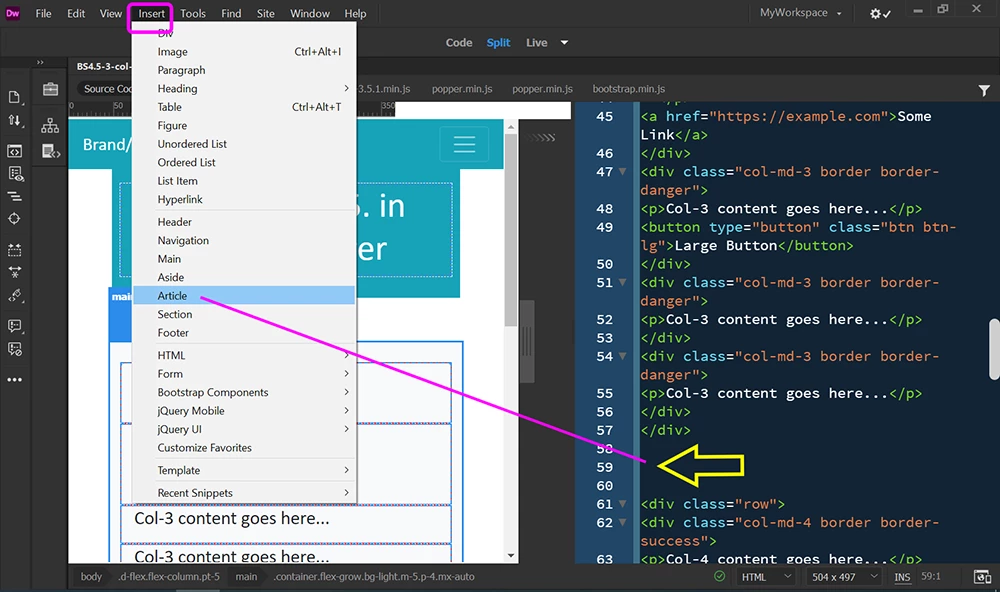
    See screenshot.  


    Place mouse at desired insertion point (yellow arrow).

    Go to Insert Menu > Article.  Repeat for Section.


    Hope that helps.


    2 replies

    Nancy OShea
    Community Expert
    Nancy OSheaCommunity ExpertCorrect answer
    Community Expert
    August 22, 2022

    See screenshot.  


    Place mouse at desired insertion point (yellow arrow).

    Go to Insert Menu > Article.  Repeat for Section.


    Hope that helps.


    Nancy O'Shea— Product User & Community Expert
    mcgriff88Author
    Participant
    August 22, 2022

    Thank You!

    Liam Dilley
    Inspiring
    August 25, 2022

    If your doing HTML, get stuck in and do the code, learn the code, learn your structures 🙂

    Jon Fritz
    Community Expert
    Community Expert
    August 22, 2022

    There are multiple ways...

    1. Manually add them in Code View

    2. Click where you want the new element to appear and select Insert > Section or Insert > Article in the main menu bar

    3. Open the Insert Window under Window > Insert and scroll down about 1/3 of the way. Click where you want the element to appear, then click the listing for it