


Participating Frequently
March 16, 2018
Answered

Security Login on Every Site

  • March 16, 2018
  • 1 reply
  • 631 views

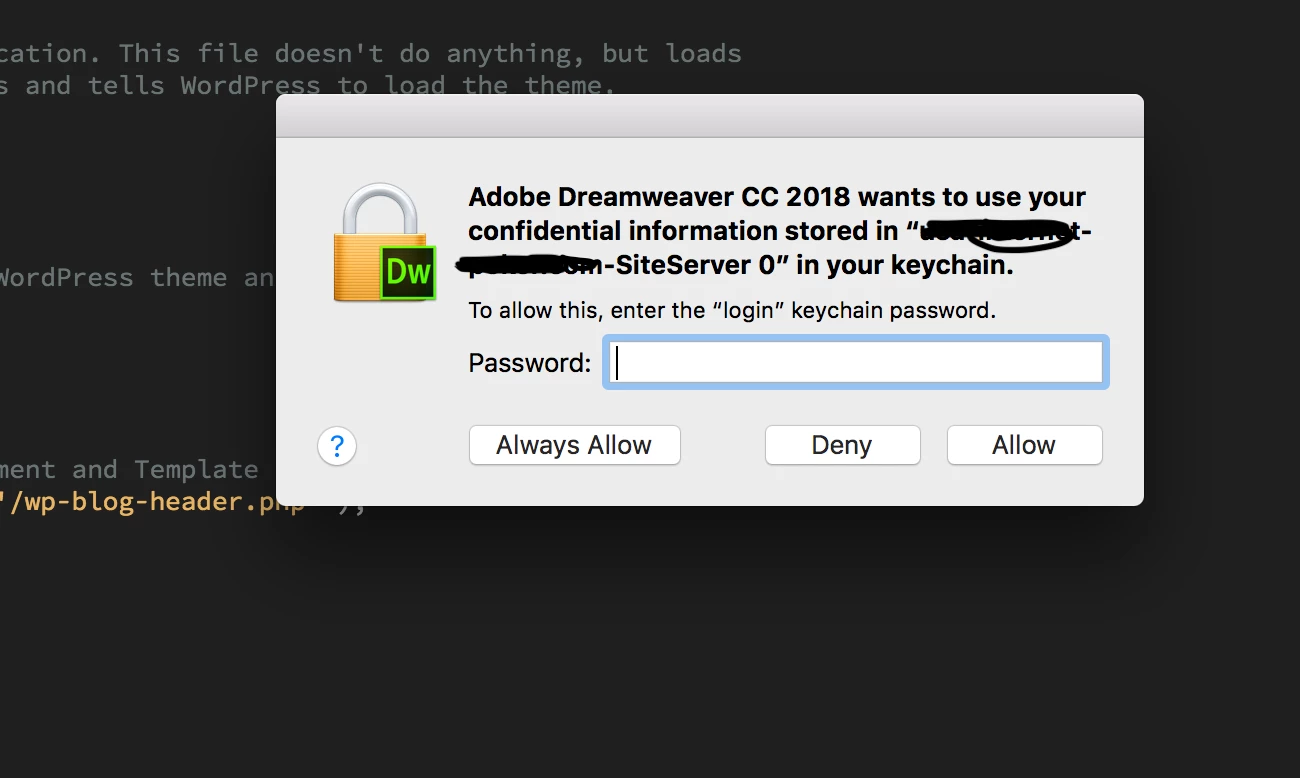
I just did the most recent update through creative cloud and now DW CC 2018 is requesting that I allow / deny access to the site information stored on my Mac. I understand security but its a annoyingly tedious to have to do this with... every ...single ...site.  Always allow should be streamlined right across the program, not site specific.
This topic has been closed for replies.
Correct answer Jon Fritz

I have 140 different sites loaded into dreamweaver, some that use https, some that don't. This has nothing to do with absolute or relative links nor does it have to do with http and https. This is a login that is now required when I open a file within a site.

Anyone else???


That is a prompt from your Mac's Keychain Access, not Dreamweaver.

Looks like the old girl got confused when you updated.

It's been far too long since I used a Mac to help with the steps, but you should be able to find info on Google on how to get that to stop popping up, that is, unless Adobe introduced a bug to the new version like they did in Acrobat Pro.

1 reply

BenPleysier
Community Expert
Community Expert
March 16, 2018

You will get that when you create absolute links like <link rel="stylesheet" type="text/css" href=" https://www.heritageceilings.com.au/style.css" />

Wappler is the DMXzone-made Dreamweaver replacement and includes the best of their powerful extensions, as well as much more!
kaus1979Author
Participating Frequently
March 16, 2018

You're joking right! Why, because I corrected your post and informed someone how to do it the correct way.

The security login has to do with opening a file in Dreamweaver - not absolute links.

BenPleysier
Community Expert
Community Expert
March 16, 2018

Try it and you will see that I am not joking.

Wappler is the DMXzone-made Dreamweaver replacement and includes the best of their powerful extensions, as well as much more!
