
higgsyd
Inspiring
July 5, 2021
Answered

seem unable to install DW to a partition other than C:

  • July 5, 2021
  • 1 reply
  • 259 views

I am going to re-install windows soon so I thought before I do it, I would get any software off the C: partition and re-install to my P: partition (p for programs - I'm so smooth!).  I un-installed DW then within CC Desktop clicked Install, confident it would ask me where I'd like to install it NO SUCH LUCK - it installed neatly back on my C: partiton!  Does anyone know if what I want to do is possible? many thanks in advance, David
    This topic has been closed for replies.
    Correct answer Nancy OShea

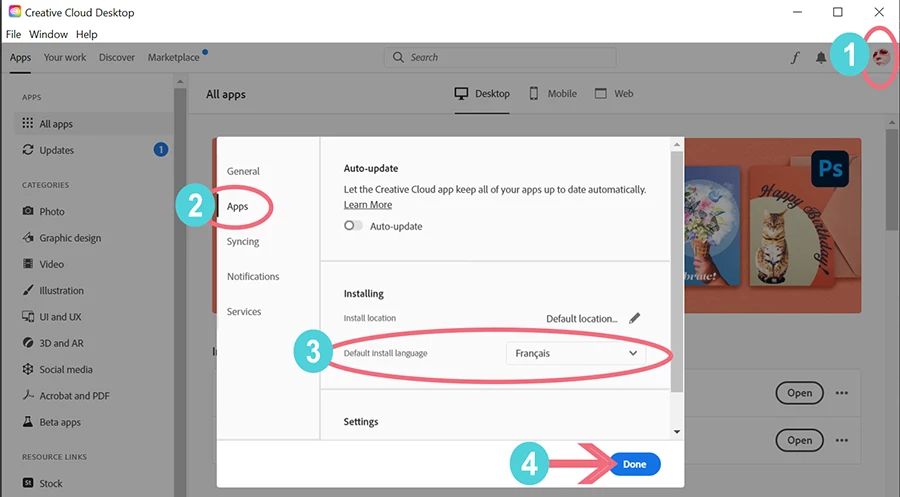
    To install Creative Cloud apps on another drive, use your Creative Cloud Desktop app to designate the Default install location.   You'll find it in your Preferences, right above the Default install language (see screenshot).


    1 reply

    Nancy OShea
    Community Expert
    Nancy OSheaCommunity ExpertCorrect answer
    Community Expert
    July 5, 2021

    To install Creative Cloud apps on another drive, use your Creative Cloud Desktop app to designate the Default install location.   You'll find it in your Preferences, right above the Default install language (see screenshot).


    Nancy O'Shea— Product User & Community Expert
    higgsyd
    higgsydAuthor
    Inspiring
    July 6, 2021

    many thanks Nancy