
Question
Selecting CSS-style with right-click
Hi!
This seems to be a recurring issue. I find references to it in the community discussion, but no good answer.
In old days (MX2004 through CSX) I used to be able to select a text, right-click, this menu appeared ...
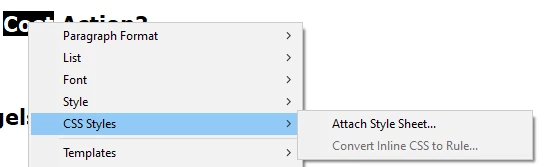
... and under the "Attch Style Sheet ..." there was a list of styles I could attach.
Now (Dreamweaver 21.1 from the CC-package) I get only the above part of menu, no styles appear, no matter how many times I (re)attach my style sheet, which has already been attached to this site for a long time.
This problem has now persisted through several CC updates. I can (and have) manage without it, but miss it somehow.
Thanks in advance for any help!
Michael


 AdChoices