Known Participant
May 13, 2019
Answered

Selectors is grayed out when trying to edit css

  • May 13, 2019
  • 6 replies
  • 1871 views

I've created a page using bootstrap and started a new css file so I could customize it. Everything was going fine and I wanted to see what my page was looking like so I clicked the icon to view my page but then when I went back to editing, I could no longer access the CSS selector. It's grayed out.

I've highlighted the section under source code that I want to add style to and I'm in Live view but since the selector is grayed out, it doesn't see the css file I started. I don't know what to try to get my editing ability back.

This topic is closed to new replies. Start a new post to keep the conversation going.
Correct answer Nancy OShea

If I'm understanding what you're asking, then yes I'm on a defined site and I can see my files under files. Am I supposed to save my custom css file in the css folder? I didn't do that but then it's been like hit or miss as far as having the option to work with my custom css file. It works for awhile and then if I leave the page to look at my site, I can't come back and do any more editing.

I'm also having an issue with the program crashing on me. That was my last problem and now I can't edit the css file again.

CS6 seemed so much easier.

I started off using the trial version and had multiple crashes so I figured it might have something to do with that but I've since purchased the annual monthly version and it's still crashing and still giving me problems editing a custom css file.


You're not required to make folders for your site assets.  I do it because it makes site management easier for me when things are organized.

Crashes can be caused by errors in your code.  Check your code often and fix reported errors.
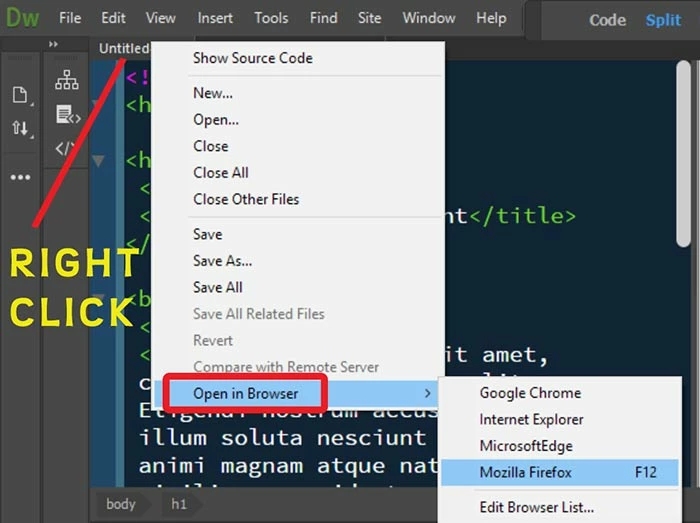
I think yo're having trouble with Real-Time Preview.  You can bypass it.  Simply right-click on an HTML  file and select Open in Browser.
When working in Live View, save often (Ctrl+S) and refresh with F5.

If you continue to have crashes, Restore Preferences.

Unusual behavior in Dreamweaver? Try restoring preferences.

6 replies

sheryltooAuthor
Known Participant
May 13, 2019

Oops. Never mind. I think I figured it out. I was on "all sources" and when I clicked current, I got the selector option back.

sheryltooAuthor
Known Participant
May 13, 2019

I still seem to be having problems with being able to access the selectors so I can edit them. It keeps getting grayed out and this time I still am trying to edit my current css file.

Nancy OShea
Community Expert
Community Expert
May 13, 2019

Are you working in a defined local site folder?  Example, C:\MyTestSite\

Go to your Files panel (F8) and click on your CSS file to open it.

Nancy O'Shea— Product User & Community Expert