
Participant
April 7, 2020
Answered

Server setup: Site not displaying on given Web-URL

  • April 7, 2020
  • 1 reply
  • 378 views

Hi all,

I'm just getting back into DW after many years, so please forgive me if I've overlooked something.

In order to have our site-in-progress online and discuss with colleagues who are now all working from home, we've set up a subfolder on our webspace, www.[our URL]/[subfolder name], yet the site is not displaying online.


Server setup:

In DW's server setup, the connection is with SFTP, the test button gives positive results;
the SFTP address is [www.our URL],
the root directory is [subfolder name]/,
and the web URL is http://www.[our URL]/[subfolder name]/;


Remote server:
All relevant files appear on the remote server, index.html being in [subfolder name]. 


It's got to be something obvious - any ideas appreciated - many thanks
    This topic has been closed for replies.
    Correct answer Nancy OShea

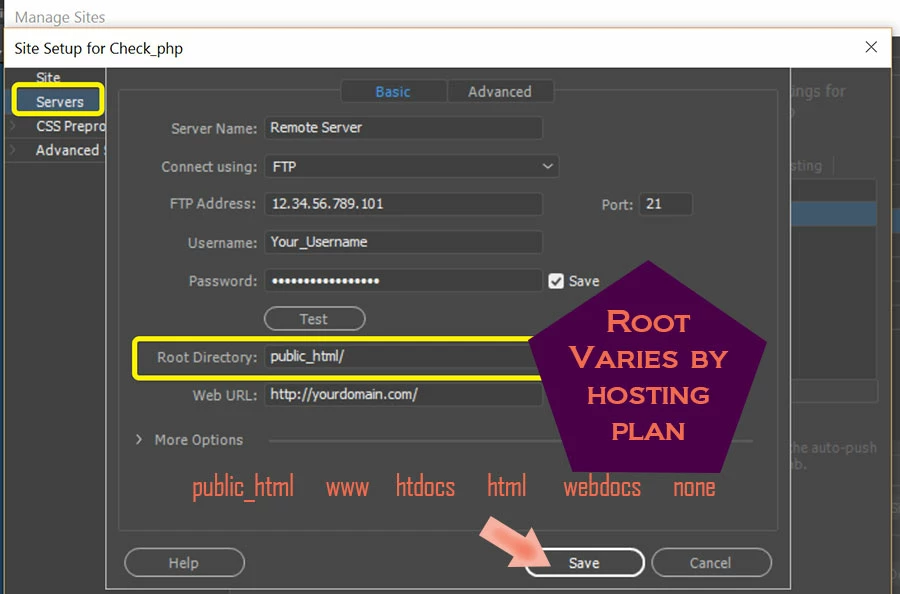
    Root directory is almost always a virtual directory created by your web host, never actually written in your URLs.  See screenshot.


    For example,  the virtual url of www . example . com / public_html

    is actually www . example . com / index. html


    Now if you want to add a sub-folder to the root, it would look like this in your site definition settings:

    www . example . com / public_html / sub_directory /


    Your index.html page will land in the sub-folder below the server's root.

    www . example . com / sub_directory /


    Post back if you have any questions.


    1 reply

    Nancy OShea
    Community Expert
    Nancy OSheaCommunity ExpertCorrect answer
    Community Expert
    April 8, 2020

    Root directory is almost always a virtual directory created by your web host, never actually written in your URLs.  See screenshot.


    For example,  the virtual url of www . example . com / public_html

    is actually www . example . com / index. html


    Now if you want to add a sub-folder to the root, it would look like this in your site definition settings:

    www . example . com / public_html / sub_directory /


    Your index.html page will land in the sub-folder below the server's root.

    www . example . com / sub_directory /


    Post back if you have any questions.


    Nancy O'Shea— Product User & Community Expert
    Participant
    April 14, 2020

    Hi Nancy, thanks so much. Finally it was to do with the remote server where the existing live site was set up in a slightly convoluted folder structure, and your comment about the root directory made me have a closer look at that. All I had to do was to move my test site in the right remote subfolder and adjust the link accordingly. Many thanks!