Known Participant
February 24, 2023
Answered

Server Side Include does not appear to be an choice in Dreamweaver

  • February 24, 2023
  • 2 replies
  • 3005 views

Ok having been forced to subscription license, have been upgraded (didn't want to) to Dreamweaver 2021.   It used to be that under Insert I had an option to Insert a Server Side Include    Has this been moved some place else, deleted or what .  I amring dreaam weaver on MacOS 12.6.3



This topic has been closed for replies.
Correct answer Jon Fritz

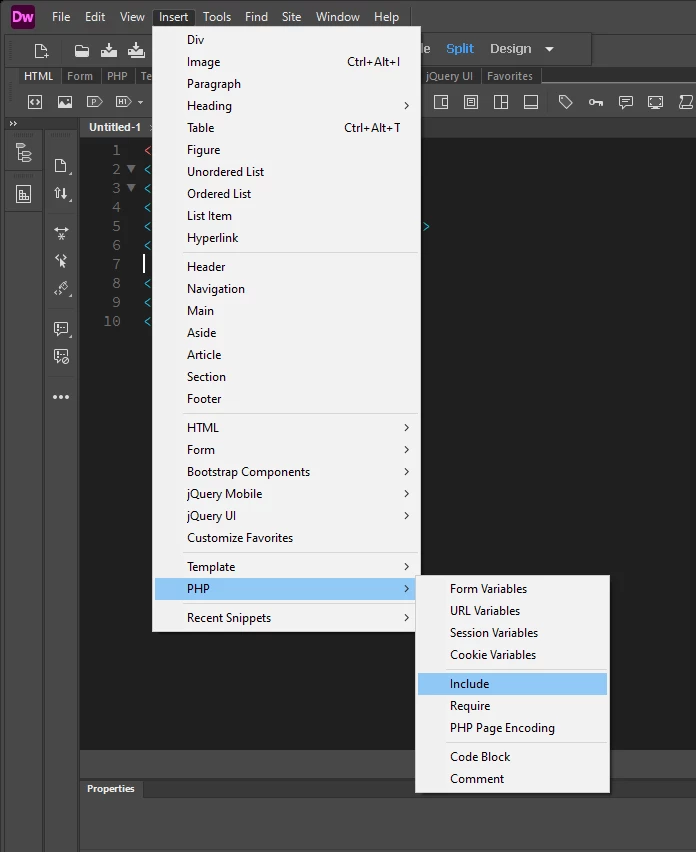
This is not completely accurate, at least as it pertains to PHP or ASP.

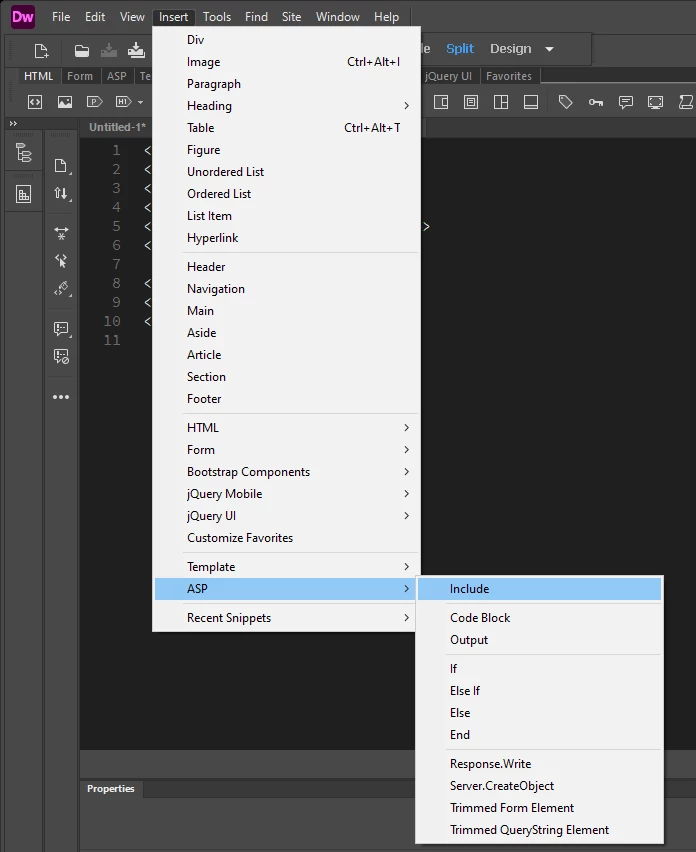
The options were moved to another location in the menu, under Insert > PHP > Include or Insert > ASP > Include, but only while working with a file that uses the correct extension. Like many of DW's menu functions over the last few major version releases, it's not an option when working withinin the "wrong" file type, like .css or .html.


2 replies

Nancy OShea
Community Expert
Community Expert
February 24, 2023
Nancy O'Shea— Product User & Community Expert
Known Participant
February 25, 2023

thanks.   is ther any way I can restore and oldr vwersion of dreamweaver. New is always better for an old fart..  My site is 15 years old and I dont have enough time left in life to redesign.   Maybe its time for me and my littoe community to call it quits.   

Nancy OShea
Community Expert
Community Expert
February 25, 2023

Too many things have changed since CS6 came out 11+ years ago -- web standards, computers, browsers, web devices, etc...


Old versions of Dreamweaver are not supported by Creative Cloud.  Only the last two versions are available from your CC Desktop App. 


Nancy O'Shea— Product User & Community Expert
Nancy OShea
Community Expert
Community Expert
February 24, 2023

SSIs were removed from the Insert Menu in 2017 when Dreamweaver's UI was rebuilt and the deprecated Server-Behavior panels got axed.


As a workaround, I created custom Code Snippets for the SSIs I most frequntly use.


PHP: <?php require_once('path/filename.html'); ?>

SHTML:  <!--#include virtual="../path/filename.html" -->

Once the generic Code Snippet is inserted, you can browse for the actual include file from your Properties Panel.


Hope that helps.


Nancy O'Shea— Product User & Community Expert
Jon Fritz
Community Expert
Jon FritzCommunity ExpertCorrect answer
Community Expert
February 27, 2023

This is not completely accurate, at least as it pertains to PHP or ASP.

The options were moved to another location in the menu, under Insert > PHP > Include or Insert > ASP > Include, but only while working with a file that uses the correct extension. Like many of DW's menu functions over the last few major version releases, it's not an option when working withinin the "wrong" file type, like .css or .html.


Known Participant
February 27, 2023

Thanks....PHP is working HTML is not.  kind of back to hand coding