Participating Frequently
July 11, 2019
Question

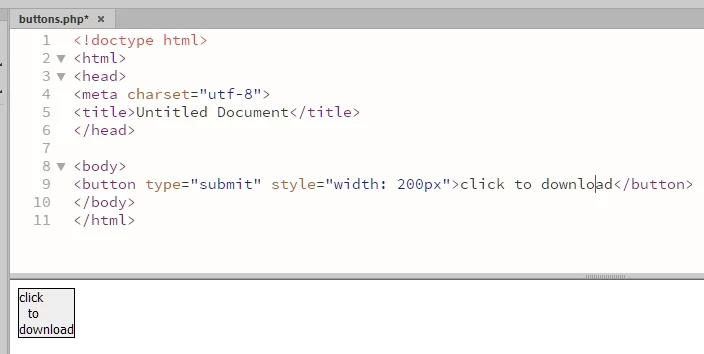
show button element in design time

  • July 11, 2019
  • 1 reply
  • 505 views

A simple code:

Because DW 2018 in desgin time it does not show the width correctly?

This topic has been closed for replies.

1 reply

Nancy OShea
Community Expert
Community Expert
July 11, 2019

Switch to Live View.   At best Design View is a rough approximation.   Live view is more accurate.

Nancy O'Shea— Product User & Community Expert
Participating Frequently
July 12, 2019

Most elements appear correctly in design mode and this is very useful for locating the source code by clicking on the image.

Live mode also became obsolete as the real-time preview.

Actually this problem with the correct visualization of the button element seems to me in fact a bug that would not be difficult to correct and would greatly improve the WYSIWYG concept of the DW.

Legend
July 12, 2019

Design view hasn't been updated for a long time - live view was supposed to be its replacement (I agree there are issues with live view). You won't get any fixes or updates to design view I'm afraid ....

To get the best out of design view you'll need to create your own design-time stylesheets to make some layouts 'workable' in design view

Paul-M - Community Expert