Chimay10
Inspiring
December 10, 2016
Answered

Site is not connecting to databases on localhost. Can't create or edit record sets/ DW4

  • December 10, 2016
  • 2 replies
  • 1186 views

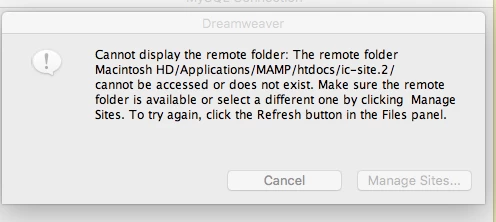
I'm trying to update a book publishing site and get undefined error messages when I try to create or edit record sets.  I can see the databases in MAMP in localhost, but can't access them. I'm using DW4 and MAMP Pro. Here's the dialogue box regarding accessability:

    This topic has been closed for replies.
    Correct answer Nancy OShea

    Checked everything.  All seems well, but still can't access. Mamp is v.4.  The site is several years old.  Just can;t access.  I'm feeling really stupid.


    Which version of PHP does Mamp use?  If it's PHP7, you're never going to connect.

    You will need PHP 5.4 or lower to use the deprecated server behavior panels.

    The panels were removed from DW in 2013 for a reason. They generate obsolete code.

    Put this code into a new PHP file.

    Change  information in bold to your own.

    Save as info.php.

    Run it on your localhost. 

    <?php

    $con = mysqli_connect("localhost","your_username","your_password","your_database_name");

    // Check connection

    if (mysqli_connect_errno())

      {

      echo "Failed to connect to MySQL: " . mysqli_connect_error();

      }

    else echo "<h1>Success in database connection! Happy Coding!</h1>";

    phpinfo()

    ?>

    This will tell you which PHP version you have.

    Nancy

    2 replies

    Chimay10
    Chimay10Author
    Inspiring
    January 9, 2017

    I've tried everything that has been suggested or that I can think of to deal with this issue.  I've only made matters worse.  I need professional help (technical).  Any ideas? Someone to climb inside all this and to get it up and going. My limited expertise is now a major hurdle.  Enough knowledge to be dangerous as it were.

    Legend
    January 9, 2017

    Do you actually get a response if you type localhost/site_folder_name/page_name.html into your browers url bar like below?

    localhost/ic-site.2/

    localhost/ic-site.2/index.html

    Also can you tell us what 'port' numbers Mamp is set to?

    When you start MAMP, I presume you have done that, go to Preferences and choose 'Ports'

    The information should be as follows:

    Apache Port: 80

    Nginx Port: 80

    MySQL Port: 3306

    Set MAMP ports to default

    Set Web & MySQL ports to 80 & 3306

    Nancy OShea
    Community Expert
    Community Expert
    December 10, 2016

    You can't be really be using Dreamweaver 4 from 16 years ago.  Don't you mean Creative Suite 4?

    Nancy O.

    Nancy O'Shea— Product User & Community Expert
    Chimay10
    Chimay10Author
    Inspiring
    December 11, 2016

    It was Late.  Of course I meant CS4.  Blurry eyes do that.

    Legend
    December 11, 2016

    I assume you have set up the local site definition details correctly in DW and there is a site folder in the mamp folder with the correct name.

    Also check what php version mamp is using as the DW server behaviours were discontinued as a result of them not being compatible with newer versions of php.

    Have you ever been able to access the folder or is this the first time of trying.

    Also have you tried changing the folder name, maybe it doesnt like the . before the 2

    Have you got any other projects in the mamp folder that you can successfully connect to.

    Are the connection details -  server name, username and password to your database correct.

    The above are the kinds of things ld be checking to try and identify where the issue might lie.