Participant
July 13, 2020
Answered

site root

  • July 13, 2020
  • 4 replies
  • 392 views

I feel so stupid asking this. But how do I find or set up a site root. Every thing that I do, I get the message thar the file images is outside the site.

This topic has been closed for replies.
Correct answer Nancy OShea

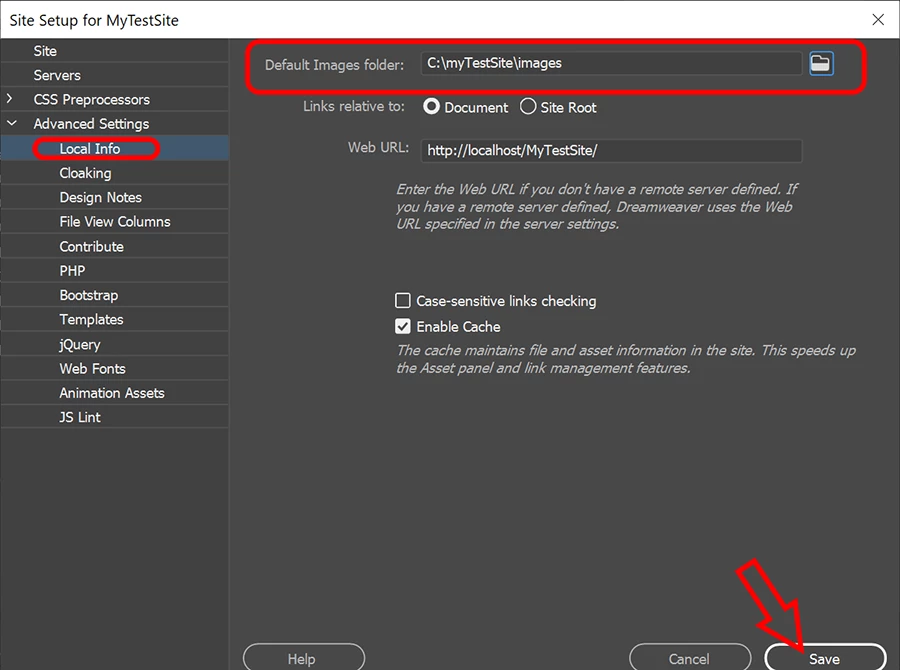
One more screenshot -- for establishing your site's default images folder.


4 replies

Nancy OShea
Community Expert
Nancy OSheaCommunity ExpertCorrect answer
Community Expert
July 13, 2020

One more screenshot -- for establishing your site's default images folder.


Nancy O'Shea— Product User & Community Expert
Nancy OShea
Community Expert
Community Expert
July 13, 2020

See screenshots. 


In this first example, my local site root is C:\myTestSite.


Second example shows the remote server's root.


Post back if you still have questions.


Nancy O'Shea— Product User & Community Expert
Community Expert
July 13, 2020

Basically when you follow that link to define a site in Dreamweaver you are defining your site.  This site will then be uploaded to your remote server and viewed on the web.  If an image exists outside of your site on your computer (ie: my photos vs. my documents) you would essentially be setting up an instance where your images are living on a separate server from your website which is not the desired result.  This is why Dreamweaver is prompting the message it is to let you know that you should move all assets (html, images, scripts, etc.) into your site folder.

Jon Fritz
Community Expert
Community Expert
July 13, 2020