


Participant
September 27, 2019
Answered

Site root below Git repository

  • September 27, 2019
  • 2 replies
  • 397 views

Let's say I have a Git repository setup, called `git-repo-web`.


Folder structure is as follows:

device1:git-repo-web user1$ tree
.
├── .git
├── .gitlab-ci.yml
├── .gitignore
├── README.md
└── htdocs
    ├── bootstrap
    |   └── css
    │       ├── bootstrap-theme.css
    │       ├── bootstrap-theme.min.css
    │       └── bootstrap.css
    ├── index.html
    ├── template-simple.html
    ├── template.html
    ├── terms.html
    └── whatsnew.html


In Dreamweaver, my site looks like this:
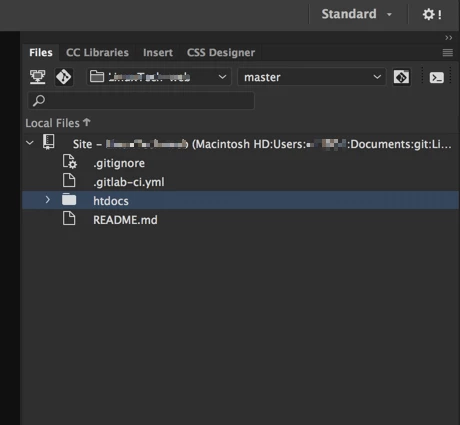
 

If I setup the Dreamweaver site at the `git-repo-web` level, it works well with my existing git repository, but when I try to view content under htdocs it does not properly display the webpages due to the way it looks for the css files.


If I setup the Dreamweaver site at the `htdocs` level, the websites render perfectly, but it does not know about the existing git repo which is a level above htdocs.


I would like to add my Dreamweaver site at the `git-repo-web` directory level so that it recognizes the existing git repository, but I want my site root to be a directory below this, which should be `htdocs`. Is this possible?


Can I define my site at `git-repo-web` and then define a symbolic root at `htdocs`?

    Correct answer BenPleysier

    I have tried various options in the past. The problem is that Dreamweaver regards the setup level as the root directory.


    Obviously I could move my .git, .gitignore, .gitlab-ci.yml, README.md into htdocs and make that the site root in Dreamweaver, but I was hoping for a little more flexibility in order to keep things organized.


    I think that this is the best way.

    2 replies

    BenPleysier
    Community Expert
    BenPleysierCommunity ExpertCorrect answer
    Community Expert
    September 28, 2019

    I have tried various options in the past. The problem is that Dreamweaver regards the setup level as the root directory.


    Obviously I could move my .git, .gitignore, .gitlab-ci.yml, README.md into htdocs and make that the site root in Dreamweaver, but I was hoping for a little more flexibility in order to keep things organized.


    I think that this is the best way.

    Wappler is the DMXzone-made Dreamweaver replacement and includes the best of their powerful extensions, as well as much more!
    etho201Author
    Participant
    September 27, 2019

    Obviously I could move my .git, .gitignore, .gitlab-ci.yml, README.md into htdocs and make that the site root in Dreamweaver, but I was hoping for a little more flexibility in order to keep things organized.

    Participant
    March 12, 2025

    " or "1"="1"--